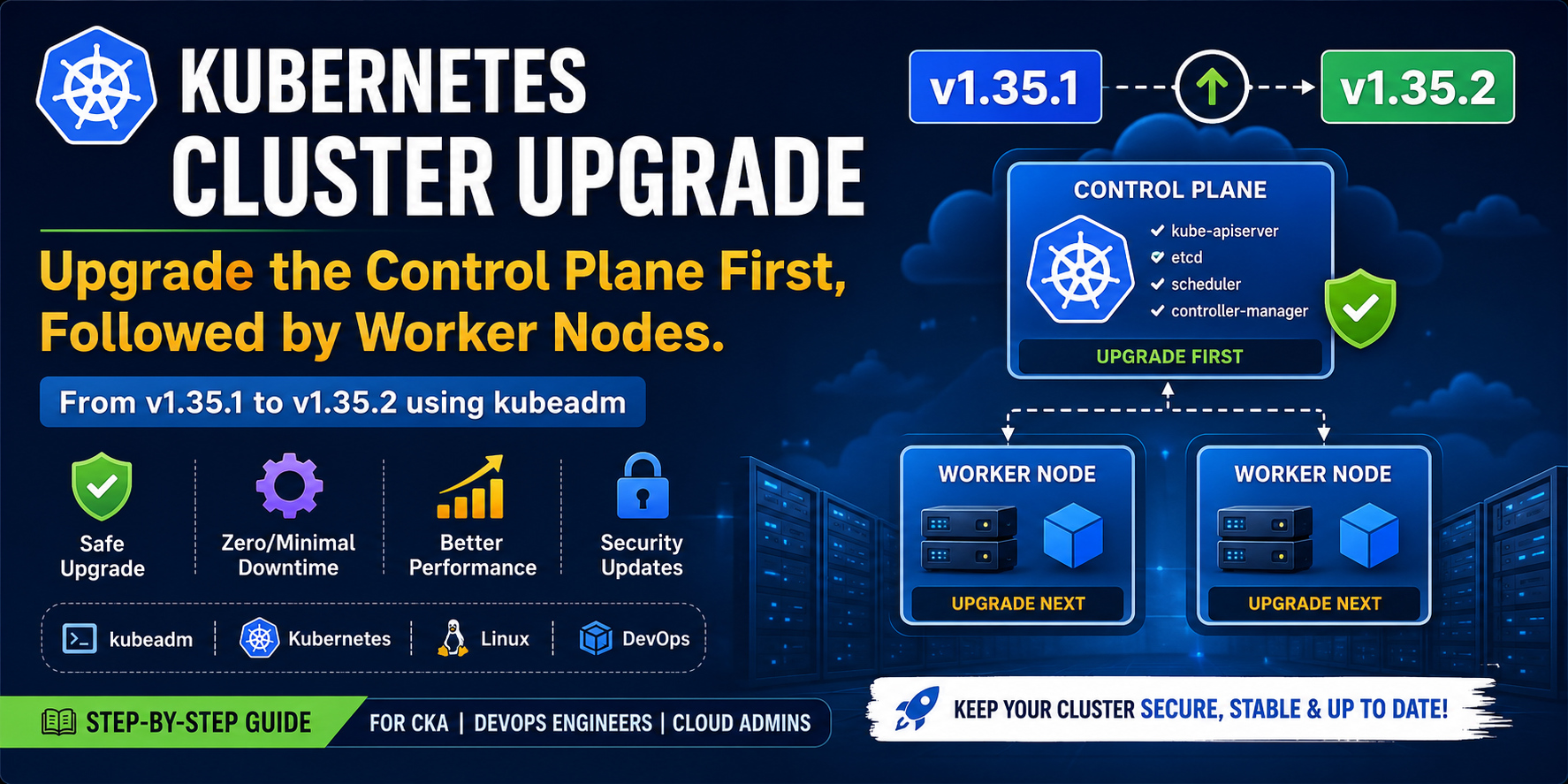
A Kubernetes cluster consists of two main components:
- Control Plane (Master Node): Manages the cluster and makes scheduling decisions.
- Worker Nodes: Run the application workloads (Pods).
The recommended upgrade order is:
- Upgrade the Control Plane.
- Upgrade each Worker Node, one at a time.
- Verify the health of the cluster after each upgrade.
In this tutorial, we will upgrade a Kubernetes cluster from v1.35.1 to v1.35.2 using kubeadm.
Kubernetes Cluster Architecture
                    Kubernetes Cluster
    ---------------------------------------------------

           +-----------------------------------+
           |          Control Plane            |
           |           v1.35.1                 |
           +----------------+------------------+
                            |
          ------------------------------------------
          |                                        |
+----------------------+               +----------------------+
|    Worker Node 01    |               |    Worker Node 02    |
|       v1.35.1        |               |       v1.35.1        |
+----------------------+               +----------------------+

        Upgrade Order

1. Control Plane
        ↓
2. Worker Node 01
        ↓
3. Worker Node 02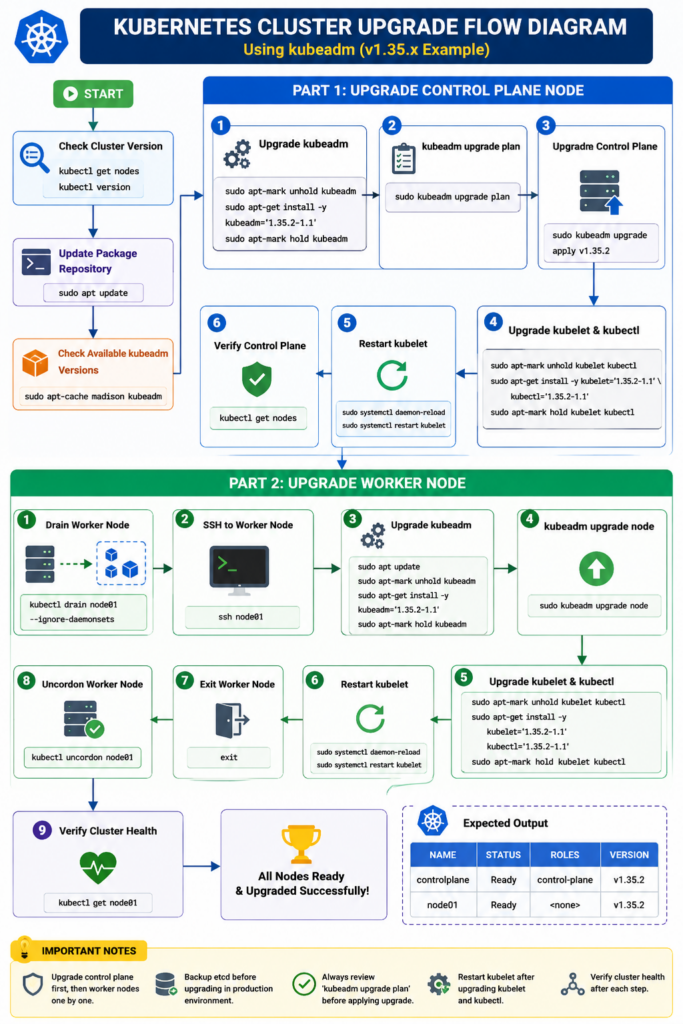
Prerequisites
Before starting the upgrade, ensure that:
- Kubernetes cluster is healthy.
- All nodes are in the
Readystate. - You have root or sudo privileges.
- Internet access is available.
- A backup of etcd has been taken (recommended for production).
Current Cluster Version
kubectl get nodesExample Output
NAME           STATUS   ROLES           VERSION
controlplane   Ready    control-plane   v1.35.1
node01         Ready    <none>          v1.35.1
Part 1 — Upgrading the Control Plane
The Control Plane manages the Kubernetes cluster. It is responsible for scheduling Pods, maintaining cluster state, handling API requests, and coordinating all cluster operations.
Always upgrade the Control Plane first.
Step 1 — Check the Current kubeadm Version
kubeadm versionStep 2 — Check Available Upgrade Versions
sudo kubeadm upgrade planThis command displays:
- Current cluster version
- Available upgrade versions
- Components that require upgrading
Step 3 — Upgrade kubeadm
Remove the package hold.
sudo apt-mark unhold kubeadmUpdate package information.
sudo apt updateInstall the latest kubeadm package.
sudo apt install -y kubeadm='1.35.2-1.1'Lock the package again.
sudo apt-mark hold kubeadmVerify the version.
kubeadm versionStep 4 — Upgrade the Control Plane
Verify the upgrade plan again.
sudo kubeadm upgrade planApply the upgrade.
sudo kubeadm upgrade apply v1.35.2Type y when prompted.
Successful Output
SUCCESS!

Your Kubernetes control plane has been upgraded.
Step 5 — Upgrade kubelet and kubectl
sudo apt-mark unhold kubelet kubectl

sudo apt install -y kubelet='1.35.2-1.1' kubectl='1.35.2-1.1'

sudo apt-mark hold kubelet kubectl
Restart kubelet.
sudo systemctl daemon-reload

sudo systemctl restart kubelet
Verify.
kubectl version --short

kubectl get nodes
Output
NAME           STATUS   ROLES           VERSION
controlplane   Ready    control-plane   v1.35.2
node01         Ready    <none>          v1.35.1
The Control Plane upgrade is now complete.
Part 2 — Upgrading the Worker Node
Now upgrade each worker node individually.
Step 1 — Drain the Worker Node
Before upgrading, move workloads to other nodes.
kubectl drain node01 --ignore-daemonsetsVerify
kubectl get nodesOutput
node01 Ready,SchedulingDisabledStep 2 — Login to the Worker Node
ssh node01Step 3 — Upgrade kubeadm
sudo apt-mark unhold kubeadm

sudo apt update

sudo apt install -y kubeadm='1.35.2-1.1'

sudo apt-mark hold kubeadm
Verify
kubeadm versionStep 4 — Upgrade Node Configuration
sudo kubeadm upgrade nodeSuccessful Output
SUCCESS!

The configuration for this node was successfully upgraded.
Step 5 — Upgrade kubelet and kubectl
sudo apt-mark unhold kubelet kubectl

sudo apt install -y kubelet='1.35.2-1.1' kubectl='1.35.2-1.1'

sudo apt-mark hold kubelet kubectl
Restart kubelet.
sudo systemctl daemon-reload

sudo systemctl restart kubelet
Verify
kubelet --versionStep 6 — Return to the Control Plane
exitStep 7 — Enable Scheduling Again
kubectl uncordon node01Step 8 — Verify the Cluster
kubectl get nodesExpected Output
NAME           STATUS   ROLES           VERSION
controlplane   Ready    control-plane   v1.35.2
node01         Ready    <none>          v1.35.2
Congratulations! Your Worker Node has been successfully upgraded.
Complete Upgrade Workflow
                     Start
                       │
                       ▼
          Check Cluster Version
                       │
                       ▼
       Upgrade Control Plane First
                       │
      ┌────────────────┴────────────────┐
      │                                 │
      ▼                                 ▼
Upgrade kubeadm               kubeadm upgrade apply
      │                                 │
      └────────────────┬────────────────┘
                       ▼
         Upgrade kubelet & kubectl
                       │
                       ▼
          Restart kubelet Service
                       │
                       ▼
       Verify Control Plane Version
                       │
                       ▼
        Drain Worker Node (node01)
                       │
                       ▼
          SSH into Worker Node
                       │
                       ▼
            Upgrade kubeadm
                       │
                       ▼
          kubeadm upgrade node
                       │
                       ▼
       Upgrade kubelet & kubectl
                       │
                       ▼
          Restart kubelet Service
                       │
                       ▼
            Exit Worker Node
                       │
                       ▼
          Uncordon Worker Node
                       │
                       ▼
         Verify Cluster Health
                       │
                       ▼
              Upgrade Complete
Complete Command Cheat Sheet
Control Plane
kubectl get nodes

kubeadm version

sudo kubeadm upgrade plan

sudo apt-mark unhold kubeadm
sudo apt update
sudo apt install -y kubeadm='1.35.2-1.1'
sudo apt-mark hold kubeadm

sudo kubeadm upgrade apply v1.35.2

sudo apt-mark unhold kubelet kubectl
sudo apt install -y kubelet='1.35.2-1.1' kubectl='1.35.2-1.1'
sudo apt-mark hold kubelet kubectl

sudo systemctl daemon-reload
sudo systemctl restart kubelet

kubectl get nodes
Worker Node
kubectl drain node01 --ignore-daemonsets

ssh node01

sudo apt-mark unhold kubeadm
sudo apt update
sudo apt install -y kubeadm='1.35.2-1.1'
sudo apt-mark hold kubeadm

sudo kubeadm upgrade node

sudo apt-mark unhold kubelet kubectl
sudo apt install -y kubelet='1.35.2-1.1' kubectl='1.35.2-1.1'
sudo apt-mark hold kubelet kubectl

sudo systemctl daemon-reload
sudo systemctl restart kubelet

exit

kubectl uncordon node01

kubectl get nodes