Category: Kubernetes, CKA, ReplicaSet, Labels, Selectors
Introduction
One of the biggest improvements of ReplicaSet over the old ReplicationController is its more expressive label selectors.
ReplicationController supports only simple equality-based selectors such as:
selector:
  env: dev
ReplicaSet introduces set-based selectors, allowing you to create much more flexible selection rules using matchExpressions.
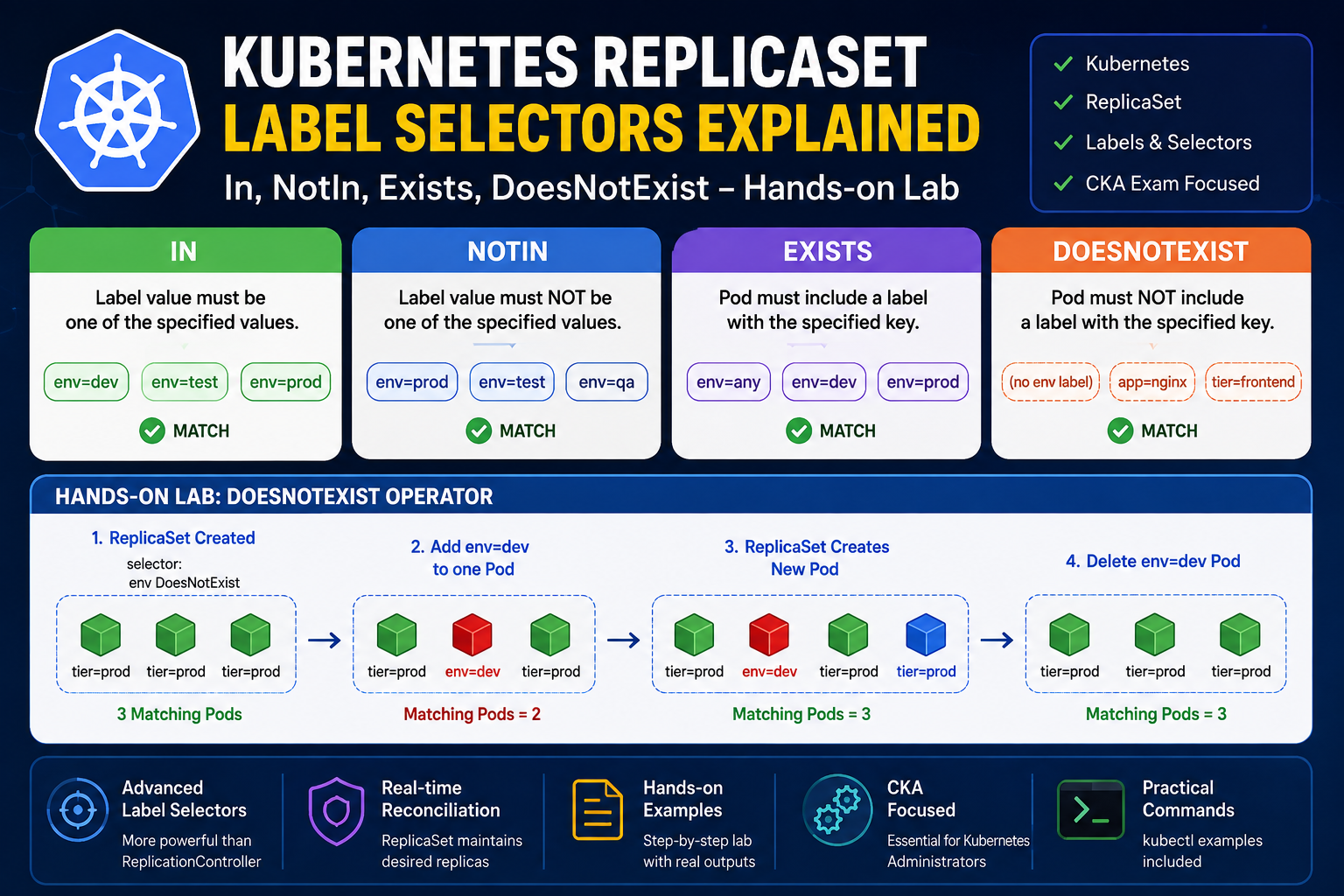
In this hands-on lab, we’ll explore all four ReplicaSet selector operators:
- In
- NotIn
- Exists
- DoesNotExist
We’ll also verify each operator by changing Pod labels and observing ReplicaSet’s behavior.
Lab Environment
- Kubernetes v1.35
- Ubuntu Linux
- ReplicaSet
- NGINX Container
ReplicaSet Match Expressions
The ReplicaSet selector supports the following operators.
| Operator | Description |
|---|---|
| In | Label value must be one of the specified values. |
| NotIn | Label value must NOT be one of the specified values. |
| Exists | Pod must contain the specified label key. |
| DoesNotExist | Pod must NOT contain the specified label key. |
1. In Operator
The In operator selects Pods whose label value matches one of the specified values.
Example:
selector:
  matchExpressions:
  - key: env
    operator: In
    values:
    - dev
    - test
    - prod
This selector means:
Select Pods whose env label is either dev, test, or prod.
ReplicaSet YAML
apiVersion: apps/v1
kind: ReplicaSet

metadata:
  name: frontend

spec:
  replicas: 3

  selector:
    matchExpressions:
    - key: env
      operator: In
      values:
      - dev
      - test
      - prod

  template:
    metadata:
      labels:
        env: dev

    spec:
      containers:
      - name: nginx
        image: nginx
How It Works
ReplicaSet
      │
      ▼
Selector:
env IN (dev,test,prod)
      │
      ▼
env=dev  ✔
env=test ✔
env=prod ✔
env=qa   ✘
2. NotIn Operator
The NotIn operator selects Pods whose label value is not included in the specified list.
Example:
selector:
  matchExpressions:
  - key: env
    operator: NotIn
    values:
    - dev
This means:
- env=prod ✔
- env=test ✔
- env=qa ✔
- env=dev ✘
Flow
ReplicaSet
      │
      ▼
env NOT IN (dev)
      │
      ▼
env=prod ✔
env=test ✔
env=dev  ✘
3. Exists Operator
Unlike In and NotIn, the Exists operator only checks whether a label key is present.
The label value doesn’t matter.
Example:
selector:
  matchExpressions:
  - key: env
    operator: Exists
Notice:
There is NO values section.
Correct.
selector:
  matchExpressions:
  - key: env
    operator: Exists
Incorrect
values:
- dev
Example
These Pods match:
env=dev
env=test
env=production
env=xyz
These Pods do NOT match:
(no env label)
Flow
ReplicaSet
      │
      ▼
Does Pod have env?
      │
 ┌────┴────┐
 │         │
Yes       No
 │         │
 ✔         ✘
4. DoesNotExist Operator
This operator is the opposite of Exists.
The Pod must NOT contain the specified label.
Example:
selector:
  matchExpressions:
  - key: env
    operator: DoesNotExist
Again,
Do NOT specify values.
Correct
operator: DoesNotExist
Wrong
values:
- dev
ReplicaSet YAML Used in This Lab
apiVersion: apps/v1
kind: ReplicaSet

metadata:
  name: frontend

spec:
  replicas: 3

  selector:
    matchExpressions:
    - key: env
      operator: DoesNotExist

  template:
    metadata:
      labels:
        tier: prod

    spec:
      containers:
      - name: nginx
        image: nginx
Notice that Pods only receive:
tier=prod
There is no env label.
Therefore, all Pods satisfy the selector.
Step 1 — Create ReplicaSet
kubectl apply -f rs.yaml
Output
replicaset.apps/frontend created
Check Pods
kubectl get pods --show-labels
Output
frontend-fscxd
frontend-k4mp8
frontend-qxj5d

tier=prod
tier=prod
tier=prod
All Pods have no env label.
ReplicaSet successfully manages all three Pods.
Step 2 — Add an env Label
Now change one Pod.
kubectl label pod frontend-k4mp8 env=dev
Output
pod/frontend-k4mp8 labeled
Check labels.
kubectl get pods --show-labels
Output
frontend-fscxd  tier=prod
frontend-k4mp8  env=dev
frontend-qxj5d  tier=prod
What Happened?
ReplicaSet immediately evaluates the selector.
| Pod | env Label | Matches? |
|---|---|---|
| frontend-fscxd | No | ✅ |
| frontend-k4mp8 | Yes | ❌ |
| frontend-qxj5d | No | ✅ |
Matching Pods become
2
Desired Pods
3
ReplicaSet automatically creates another Pod.
Step 3 — ReplicaSet Creates a New Pod
A new Pod appears.
frontend-pbhx9
Its labels
tier=prod
Again,
There is no env label.
Therefore,
ReplicaSet now has
3 Matching Pods
Step 4 — Delete the Modified Pod
Delete the Pod that contains env=dev.
kubectl delete pod frontend-k4mp8
Check Pods again.
kubectl get pods --show-labels
Output
frontend-fscxd
frontend-pbhx9
frontend-qxj5d

tier=prod
tier=prod
tier=prod
ReplicaSet already had three matching Pods, so it did not need to create another one.
Complete Flow Diagram
                 ReplicaSet
                      │
                      ▼
        Selector = env DoesNotExist
                      │
                      ▼
      Create 3 Pods (tier=prod only)
                      │
                      ▼
     Add env=dev to one Pod manually
                      │
                      ▼
     Pod no longer matches selector
                      │
                      ▼
      Matching Pods become 2
                      │
                      ▼
 ReplicaSet automatically creates
        one replacement Pod
                      │
                      ▼
    Replacement Pod has no env label
                      │
                      ▼
     Matching Pods become 3 again
                      │
                      ▼
 Delete modified Pod (env=dev)
                      │
                      ▼
 ReplicaSet already has 3 matching Pods
 No additional Pod creation required
Common Errors
Error 1
field is immutable
Reason
ReplicaSet selectors cannot be changed after creation.
Solution
Delete the ReplicaSet first.
kubectl delete rs frontend
kubectl apply -f rs.yaml
Error 2
selector does not match template labels
Reason
The Pod template labels do not satisfy the ReplicaSet selector.
Always ensure:
Template Labels
        =
ReplicaSet Selector
Comparison of All Operators
| Operator | Checks | Example Match |
|---|---|---|
| In | Value is inside list | env=dev |
| NotIn | Value is not inside list | env=prod |
| Exists | Label key exists | env=anything |
| DoesNotExist | Label key does not exist | No env label |
Key Takeaways
- ReplicaSet provides much more powerful selectors than ReplicationController.
- In matches one or more specific values.
- NotIn excludes specified values.
- Exists only checks for the presence of a label key.
- DoesNotExist selects Pods where the specified label key is absent.
- ReplicaSet continuously monitors matching Pods and automatically creates replacement Pods whenever the number of matching Pods falls below the desired replica count.
- ReplicaSet selectors are immutable after creation, so any selector change requires recreating the ReplicaSet.
Conclusion
ReplicaSet’s expressive label selectors make Kubernetes workload management far more flexible than the older ReplicationController. By understanding the behavior of In, NotIn, Exists, and DoesNotExist, you can design more intelligent scheduling and application management strategies.
This hands-on lab demonstrated not only how each selector works but also how ReplicaSet reacts in real time when Pod labels change. These concepts are essential for Kubernetes administrators and are frequently tested in the Certified Kubernetes Administrator (CKA) exam.