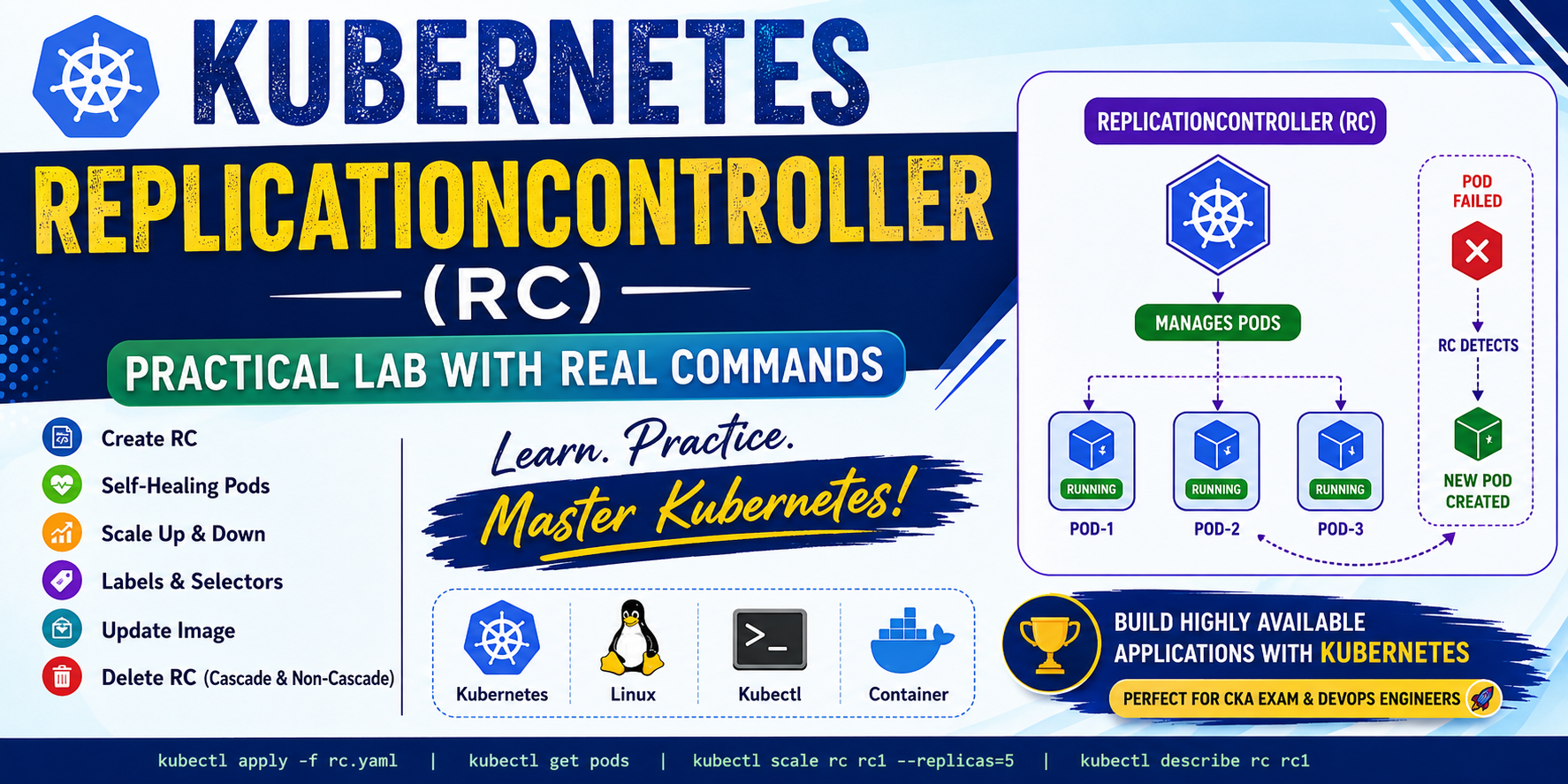
In this blog, I will demonstrate:
- Creating Pods manually
- Creating ReplicationController
- Automatic Pod Recovery
- Scaling Pods
- Editing ReplicationController
- Understanding Labels & Selectors
- Changing Labels
- Deleting RC with and without Pods
- Complete command output explanation
What is ReplicationController?
A ReplicationController (RC) ensures that a specified number of Pod replicas are always running.
If a Pod crashes or is deleted accidentally, Kubernetes automatically creates another Pod.
Responsibilities
- Maintain desired number of Pods
- Self-Healing
- Scaling Pods
- Managing Pod replicas
Lab-1: Create a Single Pod
Create an nginx Pod.
kubectl run pod1 --image=nginxOutput
pod/pod1 created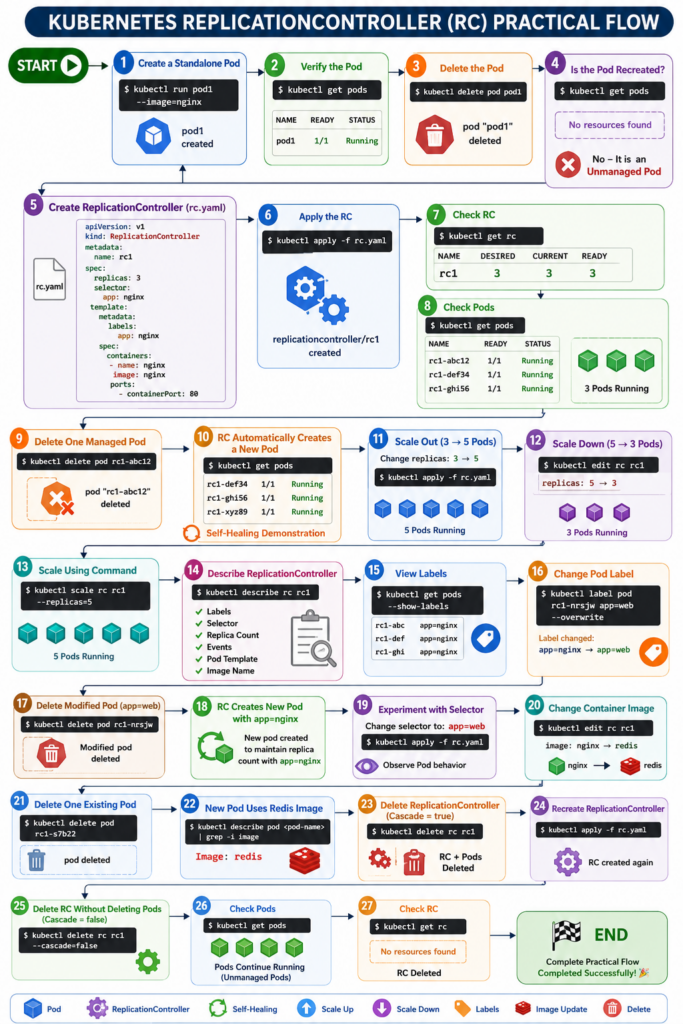
Check the Pod.
kubectl get podsOutput
NAME    READY   STATUS    RESTARTS   AGE
pod1    1/1     Running   0          20s
Delete the Pod
kubectl delete pod pod1Output
pod "pod1" deletedCheck again.
kubectl get podsOutput
No resources foundNotice that Kubernetes does not recreate the Pod because it is an unmanaged Pod.
Create ReplicationController
Create rc.yaml
apiVersion: v1
kind: ReplicationController

metadata:
  name: rc1

spec:
  replicas: 3

  selector:
    app: nginx

  template:
    metadata:
      labels:
        app: nginx

    spec:
      containers:
      - name: nginx
        image: nginx
        ports:
        - containerPort: 80
Deploy it.
kubectl apply -f rc.yamlOutput
replicationcontroller/rc1 createdCheck RC.
kubectl get rcOutput
NAME   DESIRED   CURRENT   READY
rc1    3         3         3
Check Pods.
kubectl get podsOutput
NAME        READY   STATUS
rc1-abc12   1/1     Running
rc1-def34   1/1     Running
rc1-ghi56   1/1     Running
Self-Healing Demonstration
Delete one Pod.
kubectl delete pod rc1-abc12Immediately check Pods.
kubectl get podsOutput
NAME        READY   STATUS
rc1-def34   Running
rc1-ghi56   Running
rc1-xyz89   Running
Notice that Kubernetes automatically created a new Pod.
This feature is called Self-Healing.
Scale Out (3 → 5 Pods)
Modify replicas in rc.yaml
replicas: 5Apply again.
kubectl apply -f rc.yamlCheck Pods.
kubectl get podsOutput
5 Pods RunningKubernetes created two additional Pods.
Scale Down Using kubectl edit
Edit the ReplicationController.
kubectl edit rc rc1Change
replicas: 5to
replicas: 3Save and exit.
Watch Pods.
kubectl get pods -wOutput
Terminating...
Running...
Kubernetes automatically removes extra Pods.
Scale Using Command
Increase replicas without editing YAML.
kubectl scale rc rc1 --replicas=5Check.
kubectl get podsOutput
5 Pods RunningThis is the easiest method for scaling.
Describe ReplicationController
kubectl describe rc rc1Useful information displayed:
- Labels
- Selector
- Replica Count
- Events
- Pod Template
- Image Name
Very useful for troubleshooting.
View Labels
kubectl get pods -o wide --show-labelsOutput
NAME        LABELS
rc1-abc     app=nginx
rc1-def     app=nginx
rc1-ghi     app=nginx
Change Pod Label
Overwrite label.
kubectl label pod rc1-nrsjw app=web --overwriteCheck labels again.
kubectl get pods -o wide --show-labelsOutput
rc1-nrsjw    app=web
others       app=nginx
Delete the Modified Pod
Delete the Pod.
kubectl delete pod rc1-nrsjwSince RC selector is
app: nginxthe modified Pod no longer matches the selector.
Kubernetes creates a new Pod with
app=nginxto maintain the desired replica count.
This demonstrates how Selectors work.
Experiment with Selector
Modify
selector:
  app: web
Apply.
kubectl apply -f rc.yamlObserve Pod behavior.
Since selectors no longer match existing Pods, Kubernetes attempts to create new Pods.
This demonstrates why selectors must be planned carefully.
Change Container Image
Edit RC.
kubectl edit rc rc1Change
image: nginxto
image: redisExisting Pods continue running with nginx.
Delete one Pod.
kubectl delete pod rc1-s7b22RC creates a new Pod.
Check image.
kubectl describe pod <pod-name> | grep -i ImageOutput
Image: redisOnly newly created Pods use the updated image.
Existing Pods remain unchanged because ReplicationController does not perform rolling updates.
Delete ReplicationController
Delete RC.
kubectl delete rc rc1Output
replicationcontroller "rc1" deletedPods are also deleted because of Cascade Deletion.
Delete RC but Keep Pods
Recreate RC.
kubectl apply -f rc.yamlDelete RC only.
kubectl delete rc rc1 --cascade=falseCheck Pods.
kubectl get podsOutput
Pods continue running.
Check RC.
kubectl get rcOutput
No resources foundPods are now unmanaged.
Important Commands Used
| Command | Purpose |
|---|---|
| kubectl run | Create Pod |
| kubectl apply | Create or Update Resources |
| kubectl get pods | View Pods |
| kubectl get rc | View ReplicationControllers |
| kubectl delete pod | Delete Pod |
| kubectl edit rc | Edit ReplicationController |
| kubectl scale | Scale Replicas |
| kubectl describe rc | Detailed Information |
| kubectl label | Change Labels |
| kubectl get pods –show-labels | View Labels |
| kubectl delete rc | Delete ReplicationController |
Key Learnings
✅ Created standalone Pod
✅ Understood unmanaged Pods
✅ Created ReplicationController
✅ Learned Self-Healing
✅ Scaled Pods Up
✅ Scaled Pods Down
✅ Used kubectl scale
✅ Edited RC
✅ Worked with Labels
✅ Worked with Selectors
✅ Updated Container Image
✅ Deleted RC
✅ Deleted RC while preserving Pods
Important Interview Questions
Why is ReplicationController used?
To ensure the desired number of Pod replicas are always running.
What happens if one Pod crashes?
ReplicationController automatically creates a replacement Pod.
Does RC support Rolling Updates?
No.
Deployments should be used instead.
Difference between ReplicationController and ReplicaSet?
| ReplicationController | ReplicaSet |
|---|---|
| Equality-based selector only | Set-based selectors supported |
| Older Kubernetes object | Modern replacement |
| Rarely used today | Used by Deployments |
Kubernetes ReplicationController (RC) Complete Workflow Diagram
                                        🚀 START
                                           │
                                           ▼
                    ┌────────────────────────────────────┐
                    │ Create Standalone Pod              │
                    │ kubectl run pod1 --image=nginx     │
                    └────────────────────────────────────┘
                                           │
                                           ▼
                    ┌────────────────────────────────────┐
                    │ Verify Pod                         │
                    │ kubectl get pods                   │
                    └────────────────────────────────────┘
                                           │
                                           ▼
                    ┌────────────────────────────────────┐
                    │ Delete Standalone Pod              │
                    │ kubectl delete pod pod1            │
                    └────────────────────────────────────┘
                                           │
                                           ▼
                    ┌────────────────────────────────────┐
                    │ Is Pod Recreated?                  │
                    │ ❌ No                              │
                    │ (Unmanaged Pod)                    │
                    └────────────────────────────────────┘
                                           │
                                           ▼
═══════════════════════════════════════════════════════════════════════════════
                 NOW CREATE A REPLICATIONCONTROLLER (RC)
═══════════════════════════════════════════════════════════════════════════════
                                           │
                                           ▼
                    ┌────────────────────────────────────┐
                    │ Create rc.yaml                     │
                    │ replicas = 3                       │
                    │ selector = app: nginx              │
                    └────────────────────────────────────┘
                                           │
                                           ▼
                    ┌────────────────────────────────────┐
                    │ Apply Configuration                │
                    │ kubectl apply -f rc.yaml           │
                    └────────────────────────────────────┘
                                           │
                                           ▼
                    ┌────────────────────────────────────┐
                    │ RC Creates 3 Pods Automatically    │
                    └────────────────────────────────────┘
                                           │
                                           ▼
═══════════════════════════════════════════════════════════════════════════════
                            SELF-HEALING DEMONSTRATION
═══════════════════════════════════════════════════════════════════════════════
                                           │
                                           ▼
                    ┌────────────────────────────────────┐
                    │ Delete One Managed Pod             │
                    │ kubectl delete pod <pod-name>      │
                    └────────────────────────────────────┘
                                           │
                                           ▼
                              RC Detects Missing Pod
                                           │
                                           ▼
                    ┌────────────────────────────────────┐
                    │ Automatically Creates              │
                    │ New Replacement Pod                │
                    └────────────────────────────────────┘
                                           │
                                           ▼
═══════════════════════════════════════════════════════════════════════════════
                                SCALING OPERATIONS
═══════════════════════════════════════════════════════════════════════════════
                                           │
                                           ▼
              ┌────────────────────────────────────────────┐
              │ Scale Out                                  │
              │ replicas: 3 → 5                            │
              │ kubectl apply -f rc.yaml                   │
              └────────────────────────────────────────────┘
                                           │
                                           ▼
                             Kubernetes Creates 2 New Pods
                                           │
                                           ▼
              ┌────────────────────────────────────────────┐
              │ Scale Down                                 │
              │ replicas: 5 → 3                            │
              │ kubectl edit rc rc1                        │
              └────────────────────────────────────────────┘
                                           │
                                           ▼
                             Kubernetes Deletes 2 Pods
                                           │
                                           ▼
              ┌────────────────────────────────────────────┐
              │ Scale Using Command                        │
              │ kubectl scale rc rc1 --replicas=5          │
              └────────────────────────────────────────────┘
                                           │
                                           ▼
═══════════════════════════════════════════════════════════════════════════════
                            LABELS & SELECTORS
═══════════════════════════════════════════════════════════════════════════════
                                           │
                                           ▼
             View Labels
        kubectl get pods --show-labels
                                           │
                                           ▼
             Change Pod Label
kubectl label pod <pod> app=web --overwrite
                                           │
                                           ▼
               Delete Modified Pod
                                           │
                                           ▼
      RC Creates New Pod With Correct Label (app=nginx)
                                           │
                                           ▼
═══════════════════════════════════════════════════════════════════════════════
                        CHANGE CONTAINER IMAGE
═══════════════════════════════════════════════════════════════════════════════
                                           │
                                           ▼
         Edit RC
 kubectl edit rc rc1
                                           │
                                           ▼
      image: nginx → redis
                                           │
                                           ▼
        Delete Existing Pod
                                           │
                                           ▼
     New Pod Created Using Redis Image
 Existing Pods Continue Using NGINX Image
                                           │
                                           ▼
═══════════════════════════════════════════════════════════════════════════════
                       DELETE REPLICATIONCONTROLLER
═══════════════════════════════════════════════════════════════════════════════
                                           │
                                           ▼
             kubectl delete rc rc1
                                           │
                                           ▼
         RC Deleted + Pods Deleted
         (Cascade = true)
                                           │
                                           ▼
═══════════════════════════════════════════════════════════════════════════════
                  DELETE RC BUT KEEP THE PODS
═══════════════════════════════════════════════════════════════════════════════
                                           │
                                           ▼
           Recreate RC
 kubectl apply -f rc.yaml
                                           │
                                           ▼
kubectl delete rc rc1 --cascade=false
                                           │
                                           ▼
             RC Deleted
             Pods Continue Running
           (Now Unmanaged Pods)
                                           │
                                           ▼
                                 🎉 END
📌 Workflow Summary
Standalone Pod
      │
      ▼
Delete Pod
      │
      ▼
Not Recreated
      │
      ▼
Create ReplicationController
      │
      ▼
3 Pods Running
      │
      ▼
Delete One Pod
      │
      ▼
Self-Healing → New Pod Created
      │
      ▼
Scale Out → 5 Pods
      │
      ▼
Scale Down → 3 Pods
      │
      ▼
Scale Using Command
      │
      ▼
Modify Labels
      │
      ▼
Selectors Match Pods
      │
      ▼
Change Image (NGINX → Redis)
      │
      ▼
Delete Pod → New Pod Uses Redis
      │
      ▼
Delete RC
      │
      ▼
RC + Pods Deleted
      │
      ▼
Recreate RC
      │
      ▼
Delete RC (--cascade=false)
      │
      ▼
Pods Continue Running (Unmanaged)
      │
      ▼
END
Conclusion
This practical lab demonstrated how Kubernetes ReplicationController maintains application availability through self-healing, automatic recovery, and replica management. While Deployments are the preferred option in modern Kubernetes, understanding ReplicationController provides a strong foundation for learning ReplicaSets and Deployments. Every CKA candidate should practice these concepts to better understand Kubernetes internals and cluster behavior.