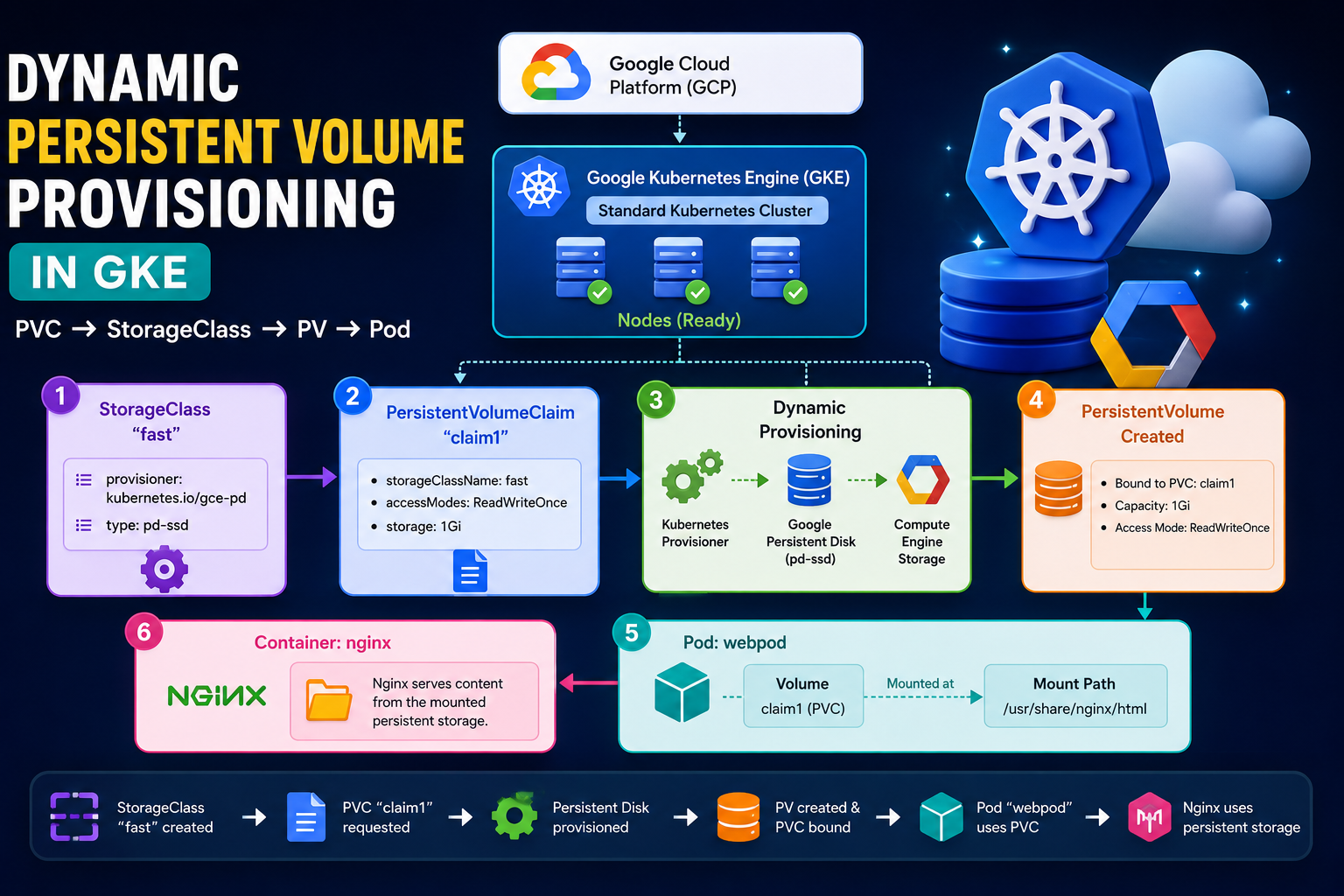
In this practical exercise, I worked with Google Cloud Platform (GCP), Google Kubernetes Engine (GKE), Kubernetes StorageClass, PersistentVolume (PV), PersistentVolumeClaim (PVC), and Pod storage.
The main goal was to understand how Kubernetes can dynamically create persistent storage and attach that storage to a Pod.
🚀 Architecture
The complete flow of this practical is:
Google Cloud
     │
     ▼
Google Kubernetes Engine (GKE)
     │
     ▼
Standard Kubernetes Cluster
     │
     ├───────────────┐
     │               │
     ▼               ▼
StorageClass       PVC
   "fast"         "claim1"
     │               │
     └───────┬───────┘
             ▼
      Dynamic Provisioning
             │
             ▼
     Google Persistent Disk
             │
             ▼
        PersistentVolume
             │
             ▼
          Pod
        "webpod"
             │
             ▼
           Nginx
1. Create a GKE Standard Cluster
First, I created a Standard GKE cluster in Google Cloud.
After connecting Cloud Shell to the cluster, I verified the Kubernetes nodes:
kubectl get nodesExample output:
NAME                                      STATUS   ROLES    AGE
gke-mycluster-default-pool-...            Ready    <none>   ...
gke-mycluster-default-pool-...            Ready    <none>   ...
gke-mycluster-default-pool-...            Ready    <none>   ...
All three nodes were in the:
Readystate.
This confirmed that my Kubernetes cluster was working properly.
2. Check Kubernetes Resources
Next, I checked the resources in the cluster:
kubectl get allThen I checked whether any PersistentVolumes existed:
kubectl get pvPVCs:
kubectl get pvcPods:
kubectl get podInitially, there were no PVs, PVCs, or application Pods because I had not created them yet.
3. Check StorageClasses
I then checked the available StorageClasses:
kubectl get scA GKE cluster already provides StorageClasses. In my practical, I wanted to create my own StorageClass called:
fastThe purpose of the StorageClass is to tell Kubernetes how to dynamically provision storage.
4. Create a PersistentVolumeClaim
I created a PVC configuration file:
vim pvc-dynamic.yamlThe configuration was:
apiVersion: v1
kind: PersistentVolumeClaim

metadata:
  name: claim1

spec:
  storageClassName: fast
  accessModes:
    - ReadWriteOnce

  resources:
    requests:
      storage: 1Gi
What does this mean?
The PVC is requesting:
- PVC name:
claim1 - StorageClass:
fast - Storage:
1Gi - Access mode:
ReadWriteOnce
The important part is:
storageClassName: fastThis tells Kubernetes:
“Use the StorageClass named
fastto provide my storage.”
5. Create the StorageClass
Next, I created:
vim sc.yamlwith:
apiVersion: storage.k8s.io/v1
kind: StorageClass

metadata:
  name: fast

provisioner: kubernetes.io/gce-pd

parameters:
  type: pd-ssd
Here:
name: fastcreates a StorageClass named fast.
And:
provisioner: kubernetes.io/gce-pdtells Kubernetes to use the Google Compute Engine Persistent Disk provisioner.
The parameter:
type: pd-ssdrequests an SSD-backed Persistent Disk.
Important: For current GKE clusters, Google recommends the GKE Persistent Disk CSI driver (
pd.csi.storage.gke.io) rather than the olderkubernetes.io/gce-pdprovisioner. Your exercise demonstrates the older provisioner concept, while your current cluster also showedstandard-rwousing the CSI driver.
6. Dynamic Provisioning
This is the most important concept in this practical.
Normally, we could manually create:
PersistentVolume → PersistentVolumeClaim → PodBut with dynamic provisioning, Kubernetes can automatically create the PersistentVolume when the PVC requests storage through a StorageClass.
The process is:
PVC claim1
     │
     ▼
StorageClass fast
     │
     ▼
Provisioner
     │
     ▼
Google Persistent Disk
     │
     ▼
PersistentVolume
     │
     ▼
PVC becomes Bound
So we don’t have to manually create a PV YAML file for this dynamic provisioning exercise.
7. Check PV and PVC
After creating the StorageClass and PVC, I checked:
kubectl get pvand:
kubectl get pvcThe PVC should eventually become:
STATUS: BoundFor example:
NAME      STATUS   VOLUME                                     CAPACITY
claim1    Bound    pvc-xxxxxxxx-xxxx-xxxx-xxxx-xxxxxxxxxxxx   1Gi
This means Kubernetes successfully created storage for the PVC.
8. Create a Pod Using the PVC
Next, I created:
vim pod-pv.yamlwith the following configuration:
apiVersion: v1
kind: Pod

metadata:
  name: webpod

spec:
  volumes:
    - name: vol1
      persistentVolumeClaim:
        claimName: claim1

  containers:
    - name: nginx
      image: nginx

      volumeMounts:
        - mountPath: "/usr/share/nginx/html"
          name: vol1
Here the Pod is called:
webpodand it uses the PVC:
claim1The PVC is mounted inside the Nginx container at:
/usr/share/nginx/html9. Apply the Pod Configuration
I applied the configuration:
kubectl apply -f pod-pv.yamlThen checked the Pod:
kubectl get podTo continuously watch the Pod status, I used:
kubectl get pod -wEventually, the Pod should become:
webpod 1/1 Running10. Describe the Pod
To understand how the storage was attached to the Pod, I used:
kubectl describe pod webpodThis command is useful for troubleshooting because it shows information such as:
- Pod status
- Node
- Containers
- Volumes
- Volume mounts
- Events
- Scheduling information
The volume section shows that the Pod is using the PVC claim1.
11. Check the PVC
I also checked:
kubectl get pvcThe PVC should show:
claim1 BoundThe relationship is:
Pod
 │
 ▼
PVC: claim1
 │
 ▼
PV
 │
 ▼
Google Persistent Disk
12. Delete the Resources
After completing the practical, I practiced deleting the resources.
First, I attempted to delete the PVC:
kubectl delete pvc claim1Then checked:
kubectl get podsNext, I deleted the Pod:
kubectl delete pod webpodThen:
kubectl get podsFinally, I deleted the PVC:
kubectl delete pvc claim1and checked:
kubectl get pvcThen:
kubectl get pv13. Delete the StorageClass
Finally, I checked the StorageClasses:
kubectl get scThen deleted my custom StorageClass:
kubectl delete sc fastAnd verified:
kubectl get scThe custom fast StorageClass was removed.
🔄 Complete Practical Flow
The entire practical can be summarized as:
                 Google Cloud
                      │
                      ▼
             GKE Standard Cluster
                      │
                      ▼
              Create StorageClass
                  "fast"
                      │
                      ▼
             Create PVC "claim1"
                  1Gi storage
                      │
                      ▼
             Dynamic Provisioning
                      │
                      ▼
          Google Persistent Disk
                      │
                      ▼
             PersistentVolume
                      │
                      ▼
             PVC → Bound
                      │
                      ▼
              Create Pod "webpod"
                      │
                      ▼
                  Nginx
                      │
                      ▼
        Mount PVC at /usr/share/nginx/html
🎯 What I Learned
From this practical, I learned:
- How to create and work with a GKE Standard cluster.
- How to check Kubernetes nodes using
kubectl get nodes. - What a PersistentVolume (PV) is.
- What a PersistentVolumeClaim (PVC) is.
- How a StorageClass works.
- How dynamic volume provisioning works.
- How to request storage using a PVC.
- How Kubernetes automatically provisions persistent storage.
- How to mount a PVC inside an Nginx Pod.
- How to inspect a Pod using
kubectl describe. - How to delete Pods, PVCs, PVs, and StorageClasses.
⭐ Key Concept
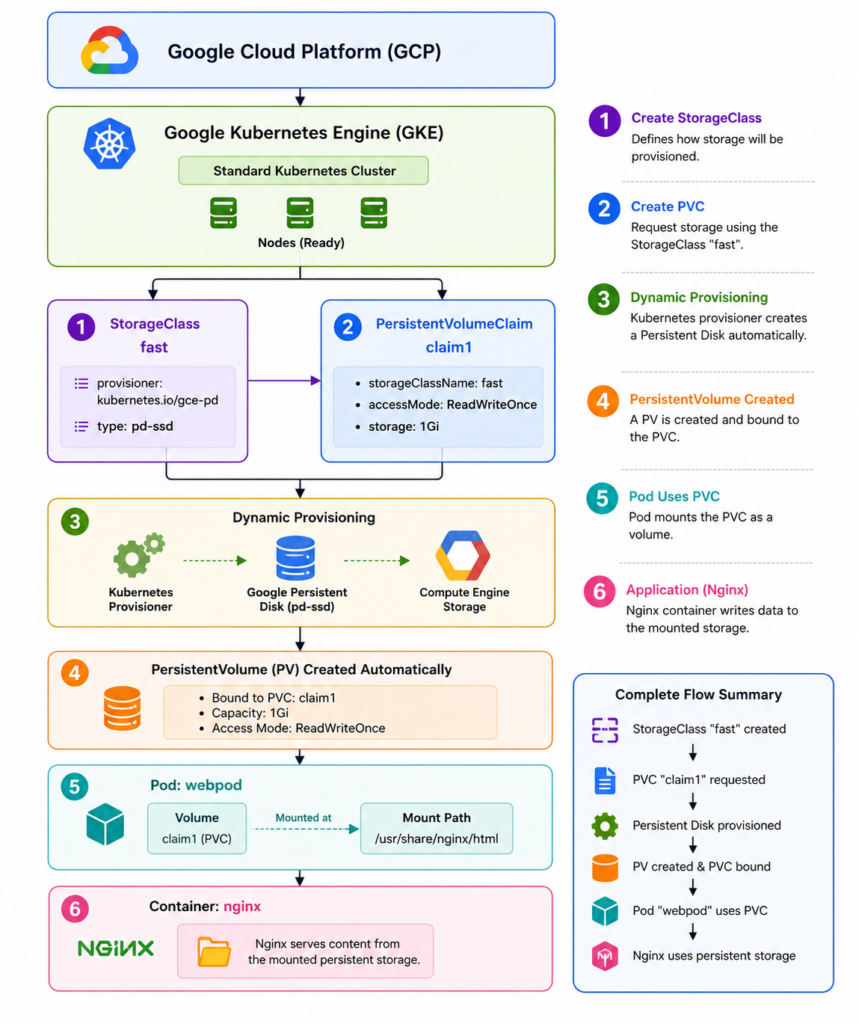
The most important thing I learned is:
A PVC requests storage, while a StorageClass defines how Kubernetes should dynamically create that storage.
This makes Kubernetes storage much easier to manage because applications can request storage without manually creating every PersistentVolume.