Magento 2 Useful Commands List In this blog, I am writing some Magento 2 Useful Commands List. Here the list of most important SSH / CLI commands for Magento 2. To use these commands you will need to have SSH access to your server or use the Command Line for local access. Di compile php -d memory_limit=10G bin/magento setup:di:compile Static content deploy php -d memory_limit=10G bin/magento setup:static-content:deploy -f Setup upgrade php
How to install Magento2 using Command Prompt in Ubuntu 17.0.4 install Magento2 using Command Prompt in Ubuntu 17.0.4 Magento2 is a powerful,highly,scalable and highly customizable e-commerce platform that can be used to build web shops and,if needed,some non-e-commerce sites.Its provide a large number of e-commerce features out of the box. A high-level overview of Magento2 is provided in the following section:- The technology stack The architectural layers The top-level

How to get title and content according to page name in WordPress. Get title and content according to page in WordPress Use the following code in you php page:- <?php $my_posts=get_page_by_title(‘yourpagename’, OBJECT,’page’); ?> <?php echo $my_posts->post_title;?> <?php echo $my_posts->post_content;?> <img src=”<?php echo wp_get_attachment_url( get_post_thumbnail_id($val));?>”> Step:-Give ur page name into ‘yourpagename’ which u set in your DASHBOAD panel in WordPress.Save it Run. **Page name is case sentative.
How to change wp-admin password in WordPress. change wp-admin password in WordPress. To Change the Wp-Admin password use the following steps and code:- Step1:-Go to https://www.sumitbera.com/phpmyadmin/ or in your MySQl database. Step2:-Open your database then press ENTER. Step3:-Then go to Table: wp_users open the table by pressing Enter. Step4:-U will see user name user_login name and copy it. Step6:- Step5:- Then click on SQL BUTTOM and paste the following code:
How to Completely uninstall PHP and MySQL at ubuntu Completely uninstall PHP and MySQL at ubuntu. Completely remove php from ubuntu 17.10 using terminal using following code 1st Step:-sudo apt-get remove –purge php* 2nd Step:-sudo apt-get purge php* 3rs Step:-sudo apt-get autoremove. 4th Step:-sudo apt-get autoclean. 5th Step:-sudo apt-get remove dbconfig-php. 6th Step:-sudo apt-get dist-upgrade. Then install fresh PHP in ur system; 7th Step:-sudo apt-get install php. Completely remove MySql
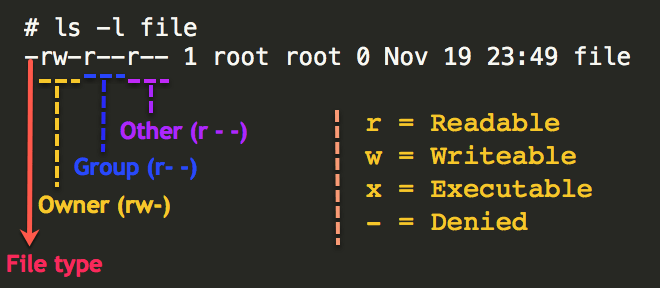
How to give READ and WRITE permission on LINUX READ and WRITE permission on LINUX Use the following steps 1.Go to to DRIVE and RIGHT CLICK on it . 2.U will see the username and drive key. copy it and close it. 3. Then Open the Terminal fresh. 4. White the command sudo chmod ugo+wx /media/<user name>/<drive keyword>. 5.Paste User name and drive key properly. 6.Then Press Enter. 7.Now u