How to Completely uninstall PHP and MySQL at ubuntu Completely uninstall PHP and MySQL at ubuntu. Completely remove php from ubuntu 17.10 using terminal using following code 1st Step:-sudo apt-get remove –purge php* 2nd Step:-sudo apt-get purge php* 3rs Step:-sudo apt-get autoremove. 4th Step:-sudo apt-get autoclean. 5th Step:-sudo apt-get remove dbconfig-php. 6th Step:-sudo apt-get dist-upgrade. Then install fresh PHP in ur system; 7th Step:-sudo apt-get install php. Completely remove MySql
Category: Linux
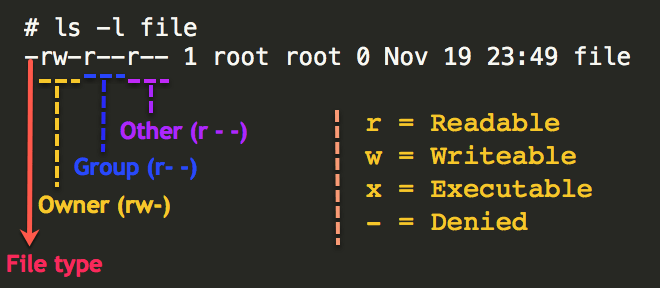
How to give READ and WRITE permission on LINUX READ and WRITE permission on LINUX Use the following steps 1.Go to to DRIVE and RIGHT CLICK on it . 2.U will see the username and drive key. copy it and close it. 3. Then Open the Terminal fresh. 4. White the command sudo chmod ugo+wx /media/<user name>/<drive keyword>. 5.Paste User name and drive key properly. 6.Then Press Enter. 7.Now u