Skip to content

Sumit's Blog

AWS Solutions Architect | DevOps Engineer | Red Hat Specialist | Former Web Developer

  • AWS
  • Kubernetes
  • Linux
  • Python
  • Magento2
  • Linux
  • WordPress
  • About Me
  • Contact Me
  • Home
  • Linux
  • How to start and Stop Docker from command line on Linux?
Linux

How to start and Stop Docker from command line on Linux?

January 15, 2025January 15, 2025 [email protected]

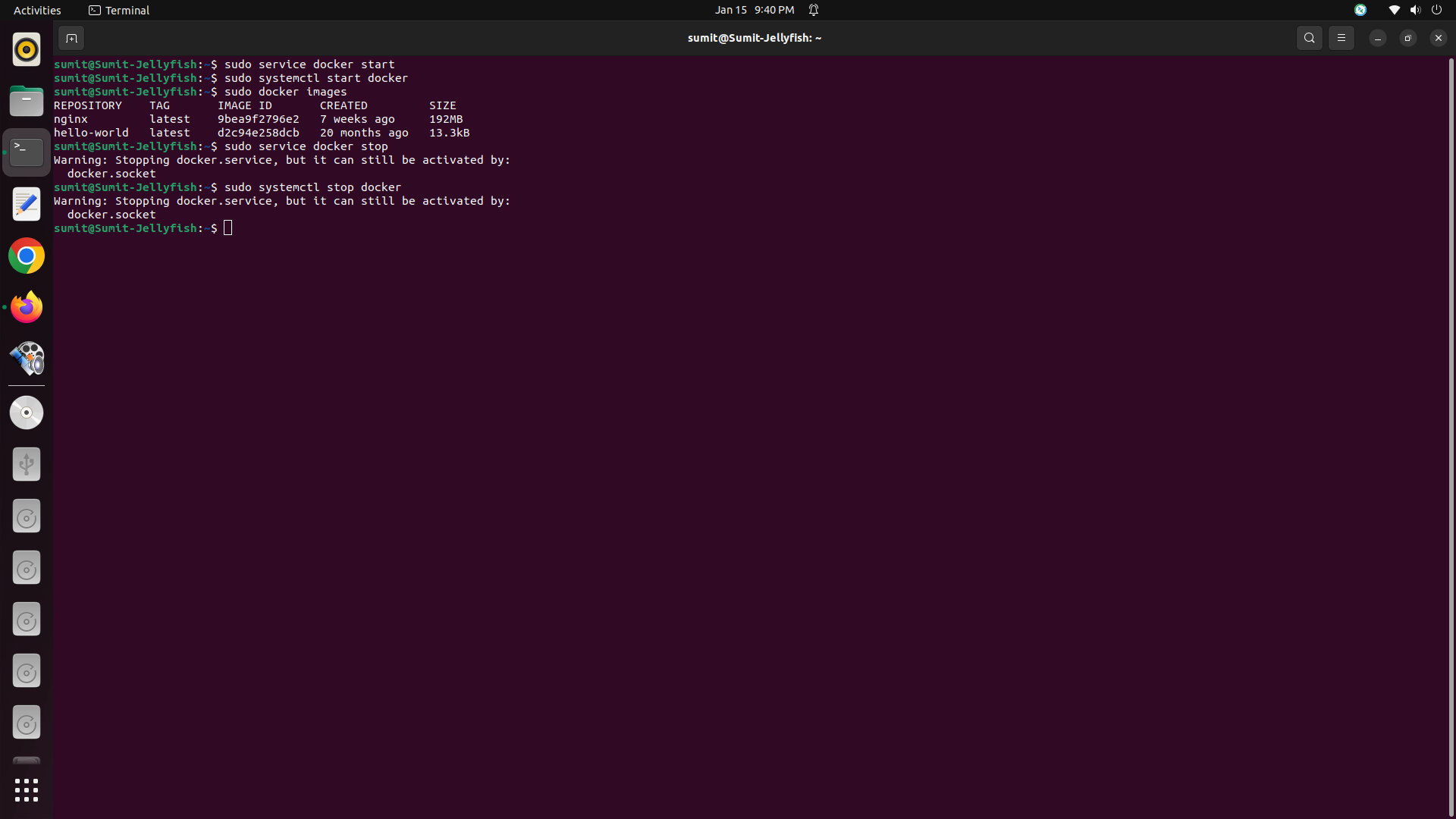
First open the terminal in Linux

To start Docker :-

$sudo service docker start #for work with SysVinit
$sudo systemctl start docker #for work with Systemd

To Stop Docker :-

$sudo service docker stop #for work with SysVinit
$sudo systemctl stop docker #for work with Systemd

Related posts:-

How to Import and Export database in MYSQL using Terminal in UBUNTU?

How to Completely uninstall PHP and MySQL at ubuntu and install fresh PHP&MySQL in UBUNTU

Linux Directory Structure Details

How to make Ubuntu stop offering to upgrade from 22.04.5 to 24.04.1 LTS?

Total Page Visits: 5522 - Today Page Visits: 1

Related Posts

Linux

How to make Ubuntu stop offering to upgrade from 22.04.5 to 24.04.1 LTS?

November 11, 2024November 11, 2024 [email protected]
Linux

How to CREATE database in MYSQL using Terminal in UBUNTU?

July 8, 2019July 20, 2019 [email protected]

Post navigation

Previous: How to make Ubuntu stop offering to upgrade from 22.04.5 to 24.04.1 LTS?
Next: Learn the basics of computer programming using R/Python

Search in site

Categories

  • AWS (8)
  • Azure-AI (1)
  • Future Technology (16)
  • Indian Technology (4)
  • Kubernetes (11)
  • Linux (8)
  • Magento2 (14)
  • Python (2)
  • Tips & Tricks (1)
  • Uncategorized (6)
  • Wordpress (14)

My Advertisement

Adsence Ads

Tags

AWS storage services (2) Certified Kubernetes Administrator (2) CKA (5) Cloud Computing (4) Cloud Native (9) Containerization (2) Container Orchestration (2) Containers (4) DevOps (12) DevOps Engineer (2) DevOps Tutorial (2) Docker (4) GKE (2) Google Cloud (3) Infrastructure as Code (2) Kubeadm (3) Kubectl (5) kubectl Commands (3) Kubelet (2) Kubernetes (10) Kubernetes Administration (4) Kubernetes Cluster (3) Kubernetes Commands (3) kubernetes for beginners (2) Kubernetes Hands-On (2) Kubernetes Lab (2) Kubernetes Labels (3) kubernetes nodes (2) Kubernetes Pod (2) kubernetes pods (4) Kubernetes Scaling (2) Kubernetes Storage (2) kubernetes tutorial (10) Kubernetes YAML (3) linux (7) Mysql (1) NGINX (4) NGINX on Kubernetes (2) PersistentVolume (2) PHP Fatal Error (2) ReplicaSet (2) ReplicationController (2) Ubuntu (4) Ubuntu 22.04 (2) YAML (3)

Magento 2 Extensions

Archives

  • September 2026 (1)
  • August 2026 (7)
  • July 2026 (3)
  • June 2026 (1)
  • May 2026 (3)
  • April 2026 (4)
  • September 2025 (4)
  • January 2025 (2)
  • November 2024 (1)
  • September 2021 (1)
  • August 2021 (1)
  • December 2020 (1)
  • April 2020 (1)
  • March 2020 (2)
  • September 2019 (1)
  • July 2019 (4)
  • June 2019 (2)
  • May 2019 (3)
  • April 2019 (17)
  • March 2019 (11)
  • February 2019 (1)
  • August 2018 (7)
  • July 2018 (2)

Advertisement

Categories

  • AWS (8)
  • Azure-AI (1)
  • Future Technology (16)
  • Indian Technology (4)
  • Kubernetes (11)
  • Linux (8)
  • Magento2 (14)
  • Python (2)
  • Tips & Tricks (1)
  • Uncategorized (6)
  • Wordpress (14)

Magento 2 Extension

Google adds

About Me

i’m a web developer that specializes in Magento2


GET IN TOUCH

  • Kolkata,West Bengal INDIA
  • (+91) 9679840783
  • [email protected]
  • [email protected]

  1. reyhan davi on How to reset the post query and use Multi-Pass Loop in WordPressAugust 30, 2026

    terima kasih informasi nya berguna

  2. reyhan davi on Created a nested Loop inside the main Loop to display related posts based on tags in WordPress.August 30, 2026

    thanks a lot of information greatfull

  1. reyhan davi on How to reset the post query and use Multi-Pass Loop in WordPressAugust 30, 2026

    terima kasih informasi nya berguna

  2. reyhan davi on Created a nested Loop inside the main Loop to display related posts based on tags in WordPress.August 30, 2026

    thanks a lot of information greatfull

      All Rights Reserved 2021.
      Proudly powered by WordPress | Theme: Fairy Blog by Candid Themes.