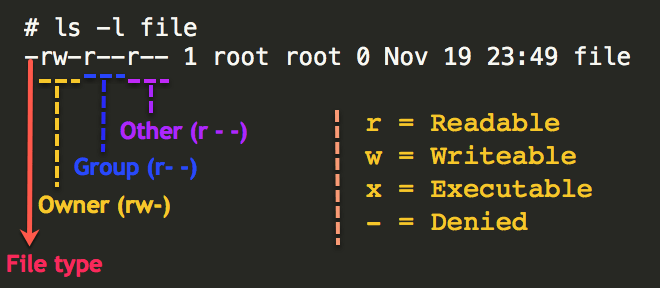
How to give READ and WRITE permission on LINUX READ and WRITE permission on LINUX Use the following steps 1.Go to to DRIVE and RIGHT CLICK on it . 2.U will see the username and drive key. copy it and close it. 3. Then Open the Terminal fresh. 4. White the command sudo chmod ugo+wx /media/<user name>/<drive keyword>. 5.Paste User name and drive key properly. 6.Then Press Enter. 7.Now u
Year: 2018

Open XAMPP Control Panel Now open your XAMPP Control Panel. Click on Apache’s Config and then navigate to PHP (php.ini).

Lorem ipsum dolor sit amet, consectetur adipiscing elit. Phasellus tempus nibh sed maximus ullamcorper. Sed quis odio placerat, pharetra sem nec, aliquam orci. Maecenas dolor risus, lobortis in felis in, porttitor fermentum neque. Nunc ac erat ut ante imperdiet mollis ac sed libero.