Level: Beginner → Intermediate
Category: Kubernetes | DevOps | CKA | Docker
Author: Sumit Bera
📚 Introduction
Kubernetes is an open-source container orchestration platform that automates the deployment, scaling, and management of containerized applications.
Before learning Deployments, Services, ReplicaSets, or Ingress, you should first understand Pods, because every application in Kubernetes runs inside a Pod.
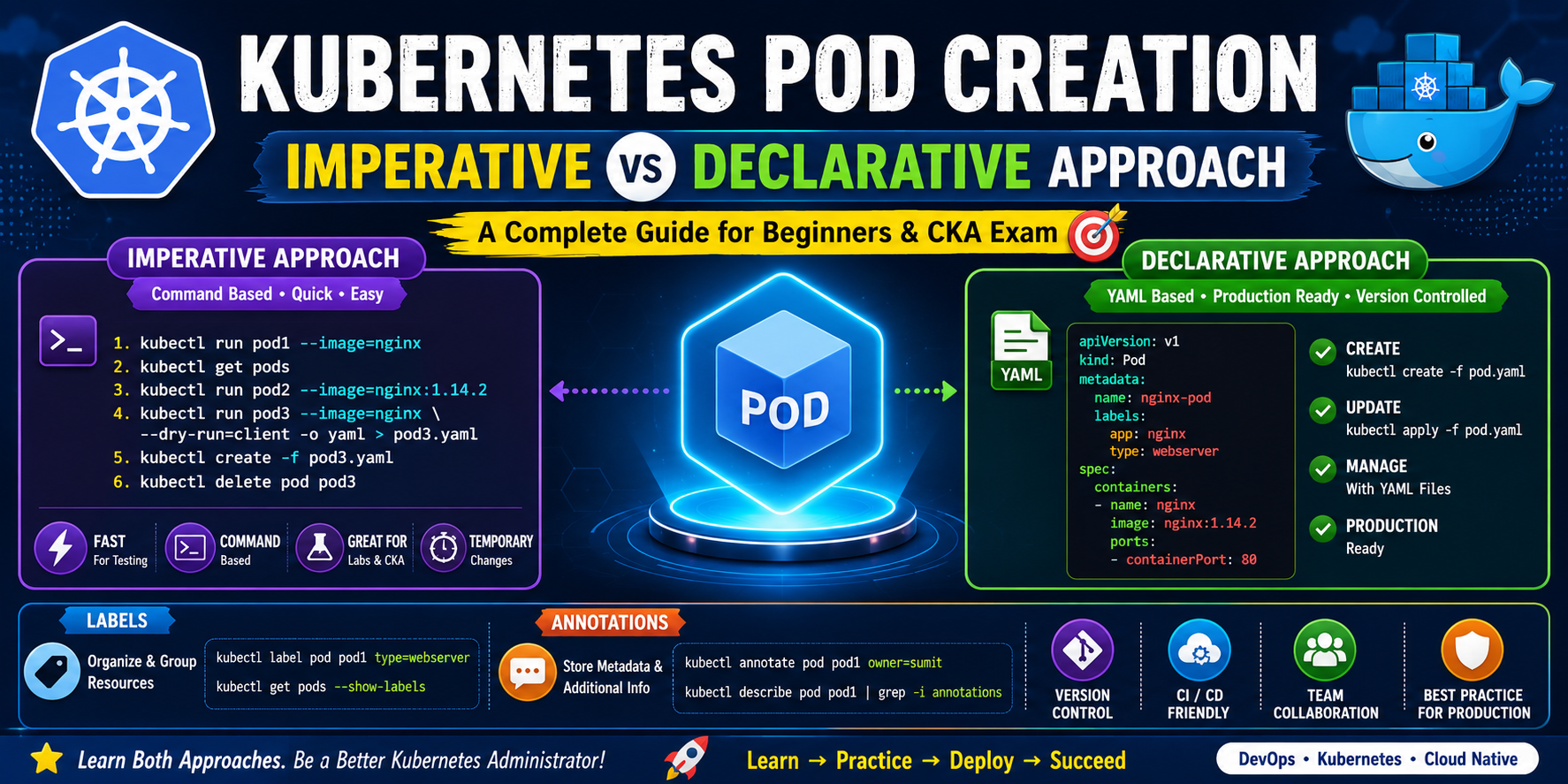
There are two methods to create Kubernetes resources:
- ⚡ Imperative Approach
- 📄 Declarative Approach
Every Kubernetes Administrator should know both methods because they are frequently used in interviews, the CKA exam, and real-world production environments.
📦 What is a Pod?
A Pod is the smallest deployable unit in Kubernetes.
A Pod can contain:
- One container (most common)
- Multiple containers (sidecar pattern)
Example
+--------------------------------+
|             Pod                |
|                                |
|  +--------------------------+  |
|  |        NGINX Container   |  |
|  +--------------------------+  |
|                                |
+--------------------------------+
🛠 Two Ways to Create Pods
| Imperative Approach | Declarative Approach |
|---|---|
| Command-based | YAML-based |
| Quick | Production Ready |
| Temporary | Version Controlled |
| Easy for Labs | Easy for Teams |
| Good for CKA | Good for Production |
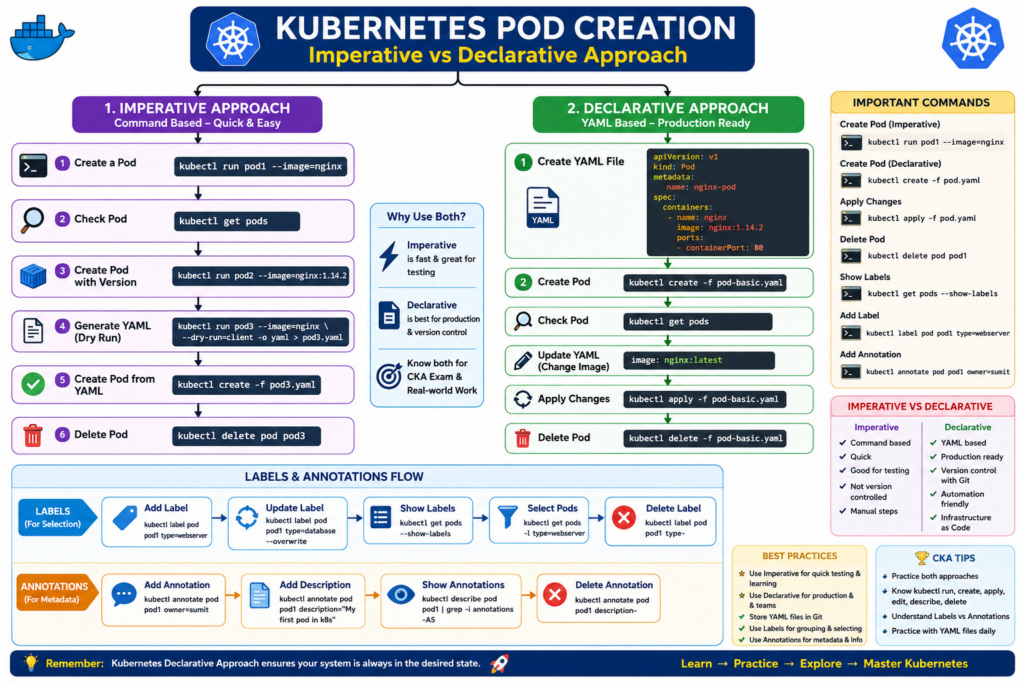
⚡ Method 1 – Imperative Approach
What is Imperative?
In the Imperative approach, you directly tell Kubernetes what to do.
Think of it like giving instructions.
Example:
Create a Pod.
Kubernetes immediately creates it.
Create a Pod
kubectl run pod1 --image=nginxOutput
pod/pod1 createdCheck the Pod
kubectl get podsOutput
NAME    READY   STATUS    RESTARTS   AGE
pod1    1/1     Running   0          10s
Create Pod with Specific Version
kubectl run pod2 --image=nginx:1.14.2Check
kubectl get podsDelete Pod
kubectl delete pod pod1Output
pod "pod1" deletedGenerate YAML without Creating the Pod
This is one of the most useful commands for CKA.
kubectl run pod3 \
--image=nginx \
--dry-run=client \
-o yaml > pod3.yaml
Nothing is created.
Only the YAML file is generated.
Open the YAML
vim pod3.yamlGenerated YAML
apiVersion: v1
kind: Pod

metadata:
  labels:
    run: pod3
  name: pod3

spec:
  containers:
  - image: nginx
    name: pod3
Create Pod Using YAML
kubectl create -f pod3.yamlVerify
kubectl get pods📄 Method 2 – Declarative Approach
What is Declarative?
Instead of telling Kubernetes what to do every time,
you describe the desired state in a YAML file.
Kubernetes continuously works to keep the cluster matching that desired state.
This is the preferred method in production.
Create YAML File
Create a file named
pod-basic.yamlYAML File
apiVersion: v1
kind: Pod

metadata:
  name: nginx-pod

  labels:
    app: nginx
    type: webserver

  annotations:
    owner: sumit
    description: Kubernetes Demo Pod

spec:
  containers:
  - name: nginx
    image: nginx:1.14.2

    ports:
    - containerPort: 80
Create Pod
kubectl create -f pod-basic.yamlVerify
kubectl get podsDescribe Pod
kubectl describe pod nginx-podView YAML
kubectl get pod nginx-pod -o yamlUpdate Image
Change
image: nginx:1.14.2to
image: nginx:latestSave the file.
Apply Changes
kubectl apply -f pod-basic.yamlOutput
pod/nginx-pod configuredVerify
kubectl describe pod nginx-pod | grep -i imageOutput
Image: nginx:latestDelete Resource
kubectl delete -f pod-basic.yamlUnderstanding Labels
Labels organize Kubernetes resources.
Example
labels:
  app: nginx
  env: production
  tier: frontend
Add Label
kubectl label pod pod1 type=webserverShow Labels
kubectl get pods --show-labelsOutput
NAME    LABELS
pod1    run=pod1,type=webserver
Update Label
kubectl label pod pod1 type=database --overwriteDelete Label
kubectl label pod pod1 type-Select Pods Using Labels
kubectl get pods -l type=webserverUnderstanding Annotations
Annotations store metadata.
Unlike labels,
Annotations are not used for selecting Pods.
Example
annotations:
  owner: sumit
  email: [email protected]
  description: My First Kubernetes Pod
Add Annotation
kubectl annotate pod pod1 owner=sumitAdd Description
kubectl annotate pod pod1 description="My First Pod in Kubernetes"Add Email
kubectl annotate pod pod1 [email protected]View Annotations
kubectl describe pod pod1 | grep -i annotations -A5Example
Annotations:
owner: sumit
email: [email protected]
description: My First Pod in Kubernetes
Remove Annotation
kubectl annotate pod pod1 description-Export Existing Pod
kubectl get pod pod1 -o yaml > pod1.yamlOpen
vim pod1.yamlModify the YAML.
Apply
kubectl apply -f pod1.yamlkubectl create vs kubectl apply
| kubectl create | kubectl apply |
|---|---|
| Creates resource | Creates or updates |
| First time only | Continuous updates |
| Fails if resource exists | Updates existing resource |
| Good for initial creation | Best for production |
| No configuration tracking | Tracks changes using last-applied-configuration annotation |
Imperative vs Declarative
| Feature | Imperative | Declarative |
|---|---|---|
| Uses Commands | ✅ | ❌ |
| Uses YAML | ❌ | ✅ |
| Easy for Beginners | ✅ | ✅ |
| Fast | ⭐⭐⭐⭐⭐ | ⭐⭐⭐ |
| Version Control | ❌ | ✅ |
| Git Friendly | ❌ | ✅ |
| CI/CD Ready | ❌ | ✅ |
| Production | ❌ | ✅ |
| Infrastructure as Code | ❌ | ✅ |
| Best Practice | Testing | Production |
Common Commands
kubectl get pods
kubectl describe pod pod1
kubectl delete pod pod1
kubectl edit pod pod1
kubectl apply -f pod.yaml
kubectl create -f pod.yaml
kubectl get pod pod1 -o yaml
kubectl label pod pod1 type=webserver
kubectl annotate pod pod1 owner=sumit
kubectl get pods --show-labels
CKA Exam Tips
✅ Learn both Imperative and Declarative methods.
✅ Memorize kubectl run, create, apply, edit, and describe.
✅ Practice creating Pods from YAML.
✅ Understand Labels and Annotations.
✅ Know the difference between create and apply.
✅ Practice exporting and modifying YAML files.
Best Practices
- Use Imperative for:
- Quick testing
- Labs
- CKA exam speed
- Troubleshooting
- Use Declarative for:
- Production
- Git repositories
- CI/CD pipelines
- Infrastructure as Code
- Team collaboration
Final Thoughts
Both approaches are essential for every Kubernetes engineer.
- Imperative is fast and ideal for learning, testing, and exam scenarios.
- Declarative is the industry standard for production because it supports version control, repeatability, automation, and Infrastructure as Code.
If you’re preparing for the CKA exam or working in a DevOps role, mastering both methods will make you more confident in managing Kubernetes clusters efficiently.