☁️ What You’ll Learn (AWS IAM Overview)
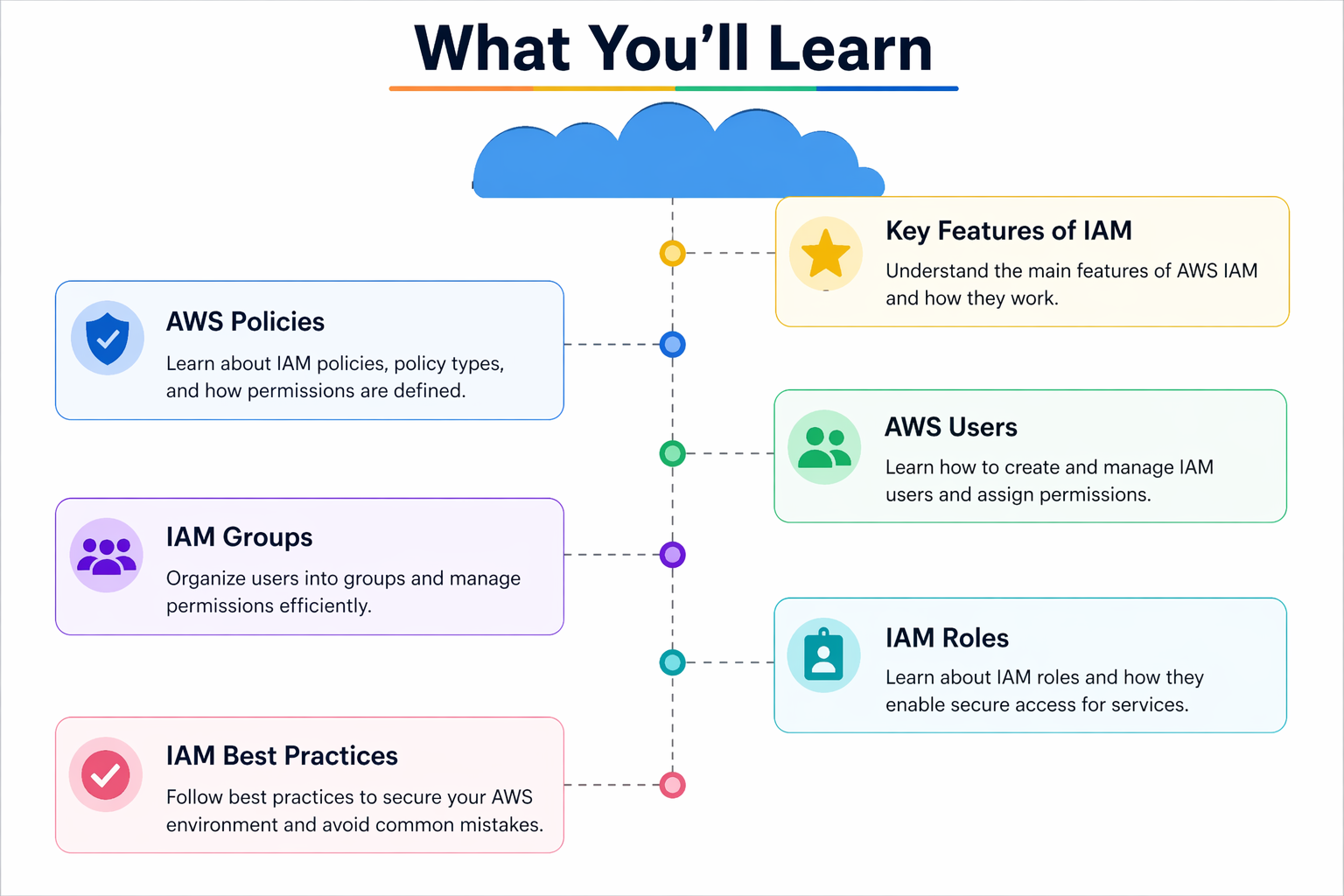
The image shows the main parts of AWS IAM (Identity and Access Management).
👉 IAM is used to control who can access AWS and what they can do.
🔹 1. AWS Policies
👉 Policies are rules (permissions)
- Define what actions are allowed or denied
- Written in JSON format
- Example:
- Allow EC2 start/stop
- Deny S3 delete
✅ Think: Policy = Permission rules
🔹 2. AWS Users
👉 Users are people or applications
- Each user has:
- Username
- Password / Access keys
- Used for login to AWS
✅ Think: User = Individual account
🔹 3. IAM Groups
👉 Groups are collections of users
- You can add multiple users to a group
- Assign one policy to the group
Example:
- “Developers” group → EC2 access
- “Admins” group → Full access
✅ Think: Group = Manage many users easily
🔹 4. IAM Roles
👉 Roles are temporary permissions
- Used by:
- EC2 instances
- Lambda
- Other AWS services
Example:
- EC2 can access S3 without password
✅ Think: Role = Temporary access (no login needed)
🔹 5. IAM Best Practices
👉 Rules to keep AWS secure
- Don’t use root account
- Use least privilege
- Enable MFA (multi-factor authentication)
- Use roles instead of access keys
✅ Think: Best Practices = Security rules
🔥 Easy Way to Remember
👉 Simple formula:
User → belongs to → Group
Group → has → Policies
Role → gives temporary access
🚀 Real-Life Example
- You create a User (Sumit)
- Add him to Developers Group
- Group has EC2 Policy
👉 Now Sumit can manage EC2
🧠 Final Summary
| Component | Meaning |
|---|---|
| Policy | Permissions |
| User | Person |
| Group | Collection of users |
| Role | Temporary access |
| Best Practice | Security rules |
Here’s a clear and simple English explanation of the IAM image 👇
☁️ What is IAM (Identity and Access Management)?
👉 IAM is an AWS service that helps you control:
- Who can access AWS
- What they can do
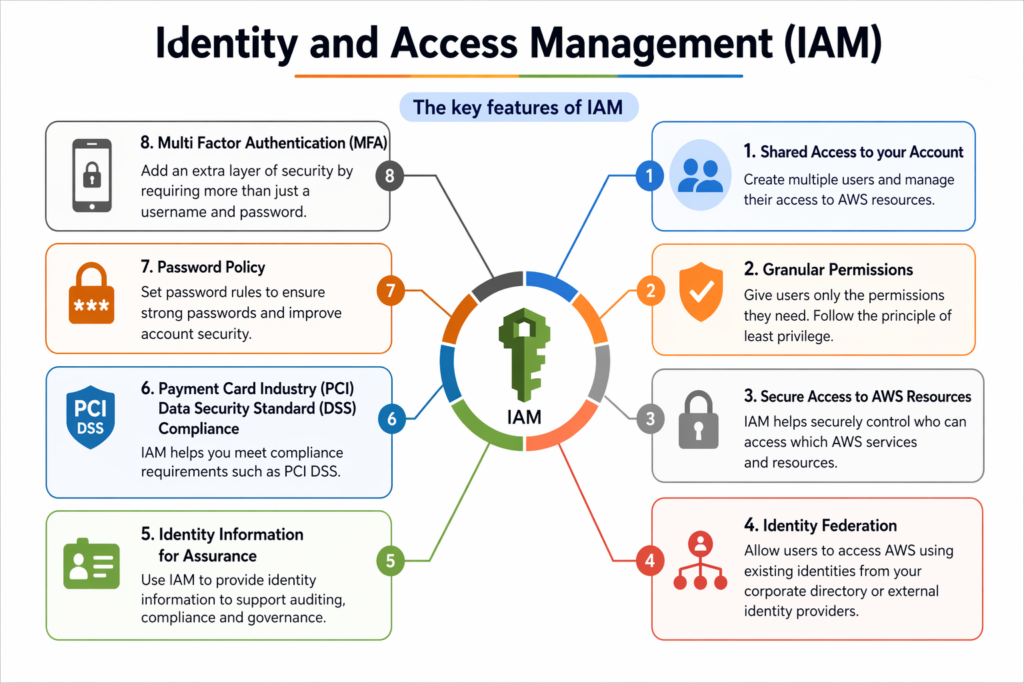
🔑 Key Features of IAM (from the image)
🔹 1. Shared Access to Your Account
👉 You can create multiple users in one AWS account
- Each user has separate login
- No need to share root account
✅ Simple: One account → many users
🔹 2. Granular Permissions
👉 You can give very specific permissions
- Control exactly what a user can do
- Follow least privilege
📌 Example:
- Only EC2 read access
- Full S3 access
✅ Simple: Give only required access
🔹 3. Secure Access to AWS Resources
👉 Keeps AWS resources secure
- Blocks unauthorized access
- Only allowed actions are permitted
✅ Simple: Security control
🔹 4. Identity Federation
👉 Login using external systems
📌 Example:
- Google login
- Company login (Active Directory)
✅ Simple: Use external login for AWS
🔹 5. Identity Information for Assurance
👉 Tracks user activity
- Logs who did what
- Helps in auditing and monitoring
✅ Simple: Tracking and auditing
🔹 6. PCI DSS Compliance
👉 Helps meet security standards
- Important for payment data security
- Ensures compliance
✅ Simple: Follow security standards
🔹 7. Password Policy
👉 Enforces strong passwords
- Minimum length
- Special characters
- Expiry rules
✅ Simple: Strong password rules
🔹 8. Multi-Factor Authentication (MFA)
👉 Adds extra security layer
- Password + OTP (2-step login)
✅ Simple: Extra login protection
🔥 Easy Formula to Remember
User → Login
Policy → Permissions
MFA → Extra Security
Federation → External Login
🚀 Real-Life Example
- You create a User (Sumit)
- Enable MFA
- Attach a Policy (EC2 access)
👉 Result:
✔️ Secure login
✔️ Controlled access
🧠 Final Summary
| Feature | Meaning |
|---|---|
| Shared Access | Multiple users |
| Granular Permissions | Fine control |
| Secure Access | Protection |
| Federation | External login |
| Identity Info | Tracking |
| PCI DSS | Compliance |
| Password Policy | Strong passwords |
| MFA | Extra security |
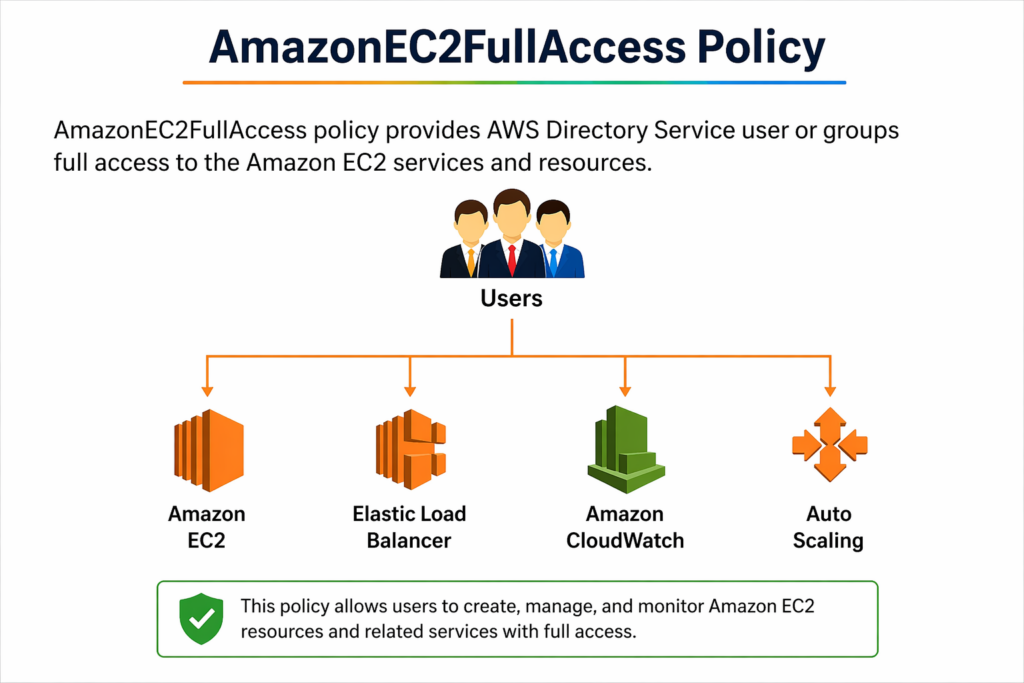
AmazonEC2FullAccess is an AWS IAM policy that gives a user or group full access to Amazon EC2 and its related services.
🔹 What does the diagram show?
👤 Users
⬇️
They are assigned the AmazonEC2FullAccess policy
⬇️
They can access and control these services:
🖥️ 1. Amazon EC2
- Create, start, stop, and delete virtual servers (instances)
👉 Basically: full control over servers
⚖️ 2. Elastic Load Balancer (ELB)
- Distributes incoming traffic across multiple EC2 instances
👉 Helps prevent server overload
📊 3. Amazon CloudWatch
- Monitors performance (CPU, logs, metrics)
👉 Helps track system health
🔄 4. Auto Scaling
- Automatically increases or decreases servers based on traffic
👉 Handles scaling without manual work
🔹 In Simple Terms
👉 This policy allows a user to:
- Manage EC2 instances
- Control load balancing
- Monitor resources
- Configure auto scaling
👉 In short: Full control over the EC2 ecosystem
⚠️ Important Note
- This is a very powerful policy
- Should only be given to trusted users/admins
- Not recommended for regular users (security risk)
🔹 Real-Life Example
If you run a website:
- EC2 = your servers
- ELB = distributes user traffic
- CloudWatch = monitors performance
- Auto Scaling = adds/removes servers automatically
👉 With this policy, a user can control all of these
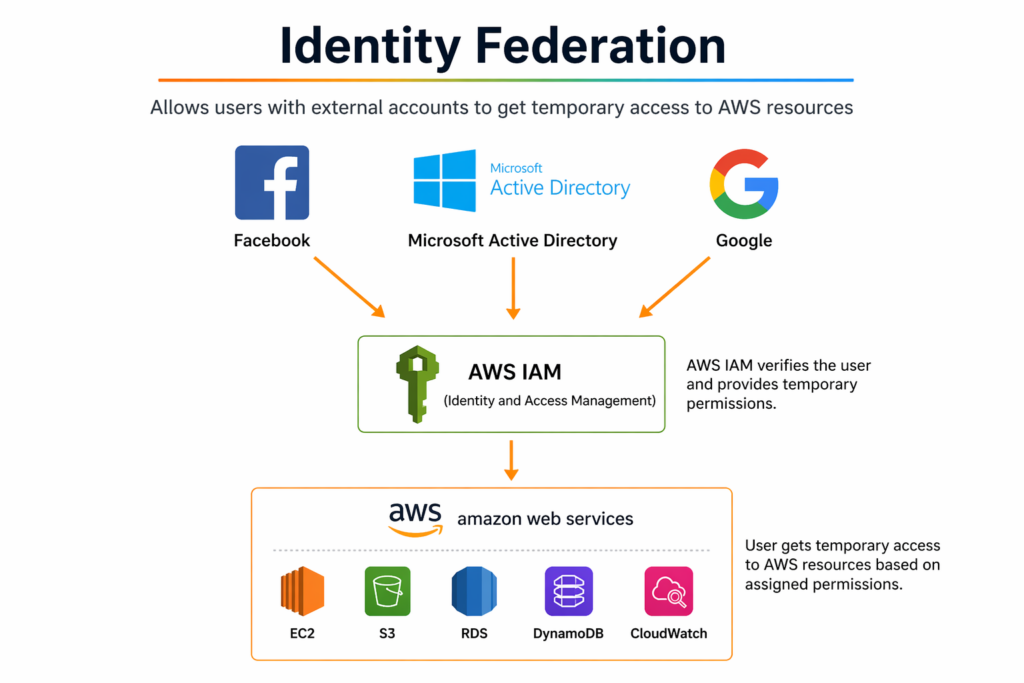
📘 Identity Federation — Simple English Explanation
🔹 What is Identity Federation?
Identity Federation allows users to log in to AWS using external accounts like:
- Microsoft Active Directory
👉 No need to create separate AWS usernames/passwords.
🔹 How it works (from the diagram)
- 👤 User logs in using external provider
(Google / Facebook / Active Directory) - 🔐 AWS IAM (Identity & Access Management)
- Verifies the user
- Assigns temporary permissions
- ☁️ Access AWS Services
- User can access EC2, S3, etc. based on permissions
🔹 Key Idea
👉 External Login → IAM Verification → Temporary AWS Access
🔹 Why use Identity Federation?
✔️ No need to manage multiple AWS accounts
✔️ More secure (temporary credentials)
✔️ Supports Single Sign-On (SSO)
✔️ Easy for companies to manage employees
🔹 Real-Life Example
Imagine a company:
- Employees log in using Active Directory (office login)
- They automatically get access to AWS resources
👉 This is Identity Federation in action
⚠️ Important
- Access is temporary, not permanent
- Permissions are controlled by IAM roles/policies
- Improves security and reduces risk
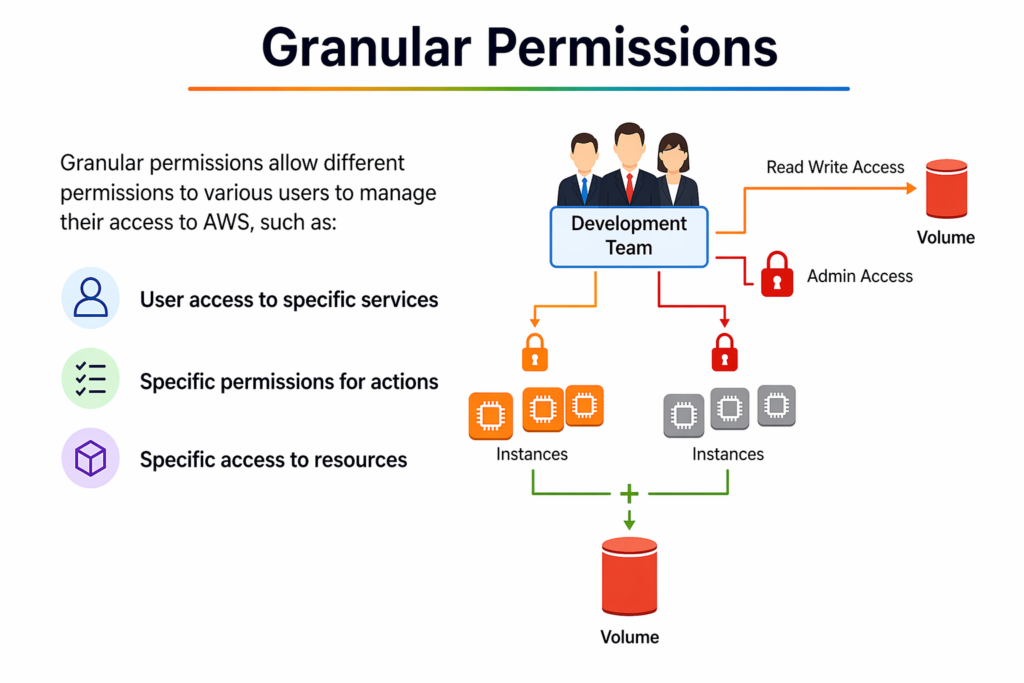
Granular Permissions in AWS mean giving very specific and limited access to users instead of full access.
👉 You control:
- Who can access
- What they can access
- What actions they can perform
🔹 What does the diagram show?
👥 Development Team (Users)
⬇️
They are given different levels of access
🔑 Types of Access in the image:
- 🔸 Read/Write Access (Volume)
- Can read and modify storage (EBS Volume)
- 🔸 Admin Access
- Full control over certain resources
- 🔸 Limited Instance Access
- Some EC2 instances are accessible
- Some are locked (no access)
🔹 Key Concept
👉 Not all users get the same permissions
👉 Access is divided based on roles and needs
🔹 3 Main Controls
- Service-level access
- Example: Only EC2, not S3
- Action-level permissions
- Example: Can start EC2, but cannot delete
- Resource-level access
- Example: Access only specific instances, not all
🔹 Why is this important?
✔️ Improves security
✔️ Follows Least Privilege Principle
✔️ Prevents accidental mistakes
✔️ Better control over resources
🔹 Real-Life Example
In a company:
- Developer → Can start/stop EC2
- Admin → Full access
- Intern → Read-only access
👉 Everyone gets only what they need
🔹 One-Line Summary
👉 Granular Permissions = Right access to the right user for the right resource