Docker networking is one of the most important concepts in container technology.
When multiple containers run on the same host machine, they need a way to communicate with each other and with the internet.
Docker solves this problem using virtual networking components such as:
docker0veth pairs- Virtual bridges
- Network interfaces
In this blog, we will understand how Docker networking works internally using a simple step-by-step explanation.
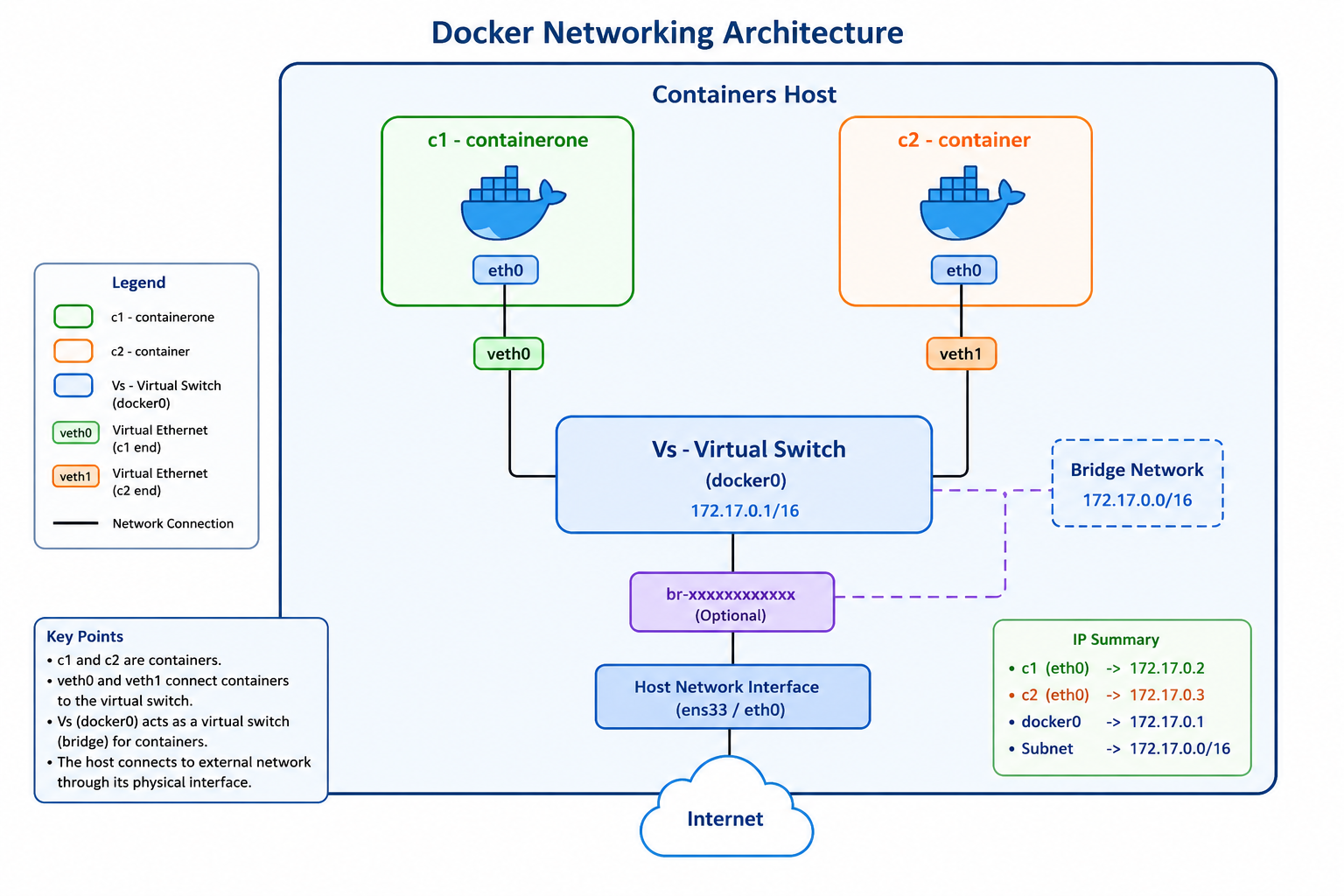
Docker Networking Architecture
In our example, we have:
c1→ Container Onec2→ Container Twoveth0andveth1→ Virtual Ethernet Interfacesdocker0→ Virtual Switch / BridgeContainer Host→ The machine running Docker
The communication flow looks like this:
Container c1
   ↓
eth0
   ↓
veth0
   ↓
docker0 (Virtual Switch)
   ↓
veth1
   ↓
eth0
   ↓
Container c2
Step 1 — Docker Creates a Virtual Bridge
When Docker is installed on a Linux system, it automatically creates a virtual bridge network called:
docker0
This bridge acts like a virtual network switch.
Its default IP address is usually:
172.17.0.1/16
All containers connected to this bridge can communicate with each other.
Step 2 — Containers are Created
Suppose we run two containers:
docker run -dit --name c1 nginx
docker run -dit --name c2 ubuntu
Docker automatically assigns private IP addresses to the containers.
Example:
| Container | IP Address |
|---|---|
| c1 | 172.17.0.2 |
| c2 | 172.17.0.3 |
Step 3 — Docker Creates veth Pairs
For every container, Docker creates a virtual Ethernet pair called a veth pair.
Example:
| Container | Virtual Interface |
|---|---|
| c1 | veth0 |
| c2 | veth1 |
A veth pair works like a virtual network cable.
One side remains inside the container, while the other side connects to the docker0 bridge.
Step 4 — Data Flow Between Containers
Now suppose c1 wants to communicate with c2.
For example:
ping 172.17.0.3
The data packet follows this path:
c1
 ↓
eth0
 ↓
veth0
 ↓
docker0
 ↓
veth1
 ↓
eth0
 ↓
c2
Step-by-Step Packet Flow
Step A — Packet is Generated
Container c1 creates a network packet to send data to c2.
Step B — Packet Reaches eth0
Inside every container, there is a network interface called:
eth0
The packet first reaches this interface.
Step C — Packet Moves Through veth0
The packet exits the container through veth0.
This works like a virtual network cable connecting the container to Docker’s virtual bridge.
Step D — Packet Arrives at docker0
The packet reaches:
docker0
which acts as a virtual switch.
Docker checks the destination IP address of the packet.
Step E — docker0 Forwards the Packet
The destination IP is:
172.17.0.3
Docker knows this IP belongs to container c2.
So the bridge forwards the packet through:
veth1
Step F — c2 Receives the Packet
The packet finally reaches:
eth0 → c2
and container c2 receives the data successfully.
How Containers Access the Internet
Containers can also access the internet through the host machine.
The flow looks like this:
Container
   ↓
veth
   ↓
docker0
   ↓
Host Network Interface
   ↓
Internet
Docker uses NAT (Network Address Translation) to allow containers to communicate with external networks.
Real-World Example
Suppose a web application uses three containers:
| Container | Purpose |
|---|---|
| NGINX Container | Web Server |
| Backend API Container | Application Logic |
| MySQL Container | Database |
Communication flow:
User Request
     ↓
NGINX Container
     ↓
Backend Container
     ↓
Database Container
All communication happens internally through Docker networking.
Why docker0 is Important
The docker0 bridge plays a major role because it:
- Connects containers together
- Acts like a virtual switch
- Provides internal networking
- Allows container-to-container communication
Without docker0, containers would not communicate easily.
Important Components Summary
| Component | Function |
|---|---|
| c1 / c2 | Containers |
| eth0 | Network interface inside container |
| veth0 / veth1 | Virtual Ethernet cable |
| docker0 | Virtual bridge / switch |
| Host Interface | Connects to internet |
Advantages of Docker Networking
Lightweight
Containers share the host kernel.
Fast Communication
Internal networking is very efficient.
Isolation
Containers remain isolated from each other.
Scalability
Applications can easily scale with multiple containers.
Conclusion
Docker networking uses virtual bridges and virtual Ethernet interfaces to connect containers efficiently.
The complete flow works like this:
Container → veth → docker0 → veth → Container
Here:
docker0acts as a virtual switchveth pairsact as virtual cables- Containers communicate using private IP addresses
- The host machine provides internet access
Understanding Docker networking is an essential step toward learning:
- Docker
- Kubernetes
- DevOps
- Cloud Computing
- Container Orchestration
Once you understand the internal networking flow, managing containerized applications becomes much easier.